Solved
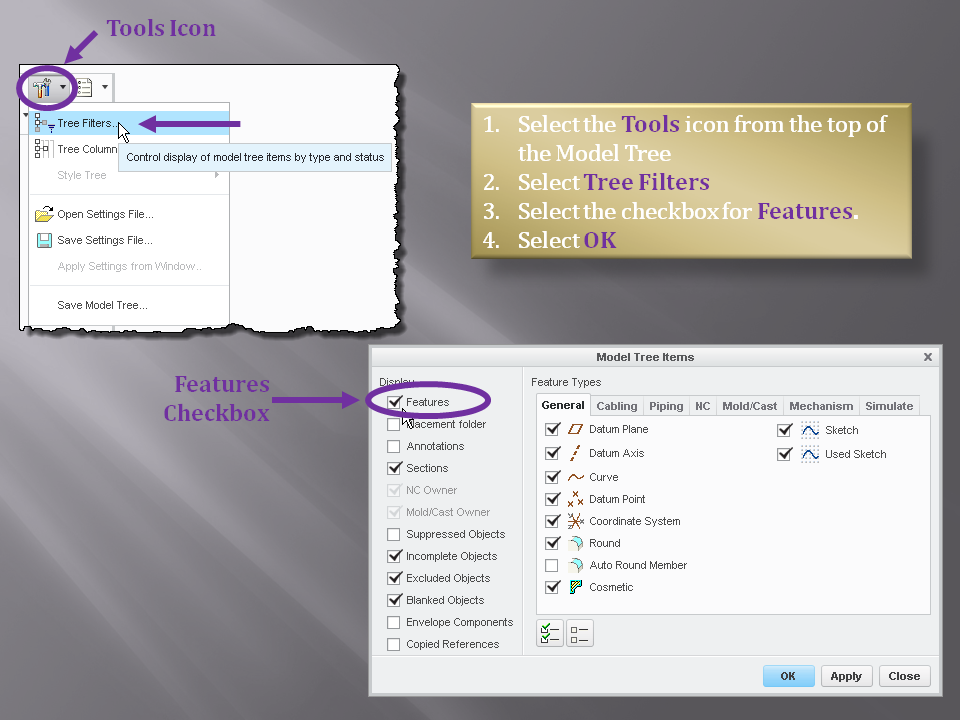
Very basic simple question about feature list in assembly
How can I make the features in assemblies visible... I have only the parts, not the features. I made a feature on the assembly level and I can't redefine it because it is not visible... It was a extusion in with "taking away material" and it is defined in the air (wrong direction)... so nothing is visible in the drawing and there is no feature in the tree.
This thread is inactive and closed by the PTC Community Management Team. If you would like to provide a reply and re-open this thread, please notify the moderator and reference the thread. You may also use "Start a topic" button to ask a new question. Please be sure to include what version of the PTC product you are using so another community member knowledgeable about your version may be able to assist.