


Dale_Rosema
23-Emerald III
23-Emerald III
October 14, 2013
Solved

View missing a part

  • October 14, 2013
  • 2 replies
  • 4445 views

I have a drawing that was created by a predecessor. It is a general view (from the top of the part) and from the best that I can tell, it is not an instance, nor a rep., nor a section view. The view is missing a top plate so that parts beneath it can bee seen. I am not sure how this was accomplished. Any suggestions?
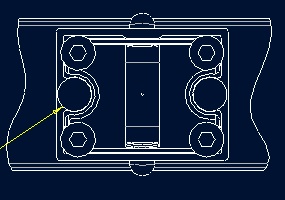
missing_plate.jpg

Typically you would see the plate and the four screws.

Thanks, Dale

Best answer by TomD.inPDX

Did he/she blank the component?

2 replies

17-Peridot
October 14, 2013

Did he/she blank the component?

Dale_Rosema
23-Emerald III
23-Emerald III
October 14, 2013

Forgive my ingnorance, but what is blanking a component and how would I check / do/ undo this to verify?

17-Peridot
October 14, 2013

I think you are stil on WF4-5...ish, right?

Somewhere in the menu you have a component display button: component_display.PNG

And when you select it, you get a menu manager menu: component_display2.PNG

Select the "unblank" and any blanked components will highlight in red for selection.

Dale_Rosema
23-Emerald III
23-Emerald III
June 18, 2019

Why when you type "Blank" in the Creo 4.0 search tool bar, does is not come up with Component Display - Blank.

Or if you do not have a drawing loaded, typing in "Component" doesn't come up with the command either. (It does if you have a drawing loaded.)

16-Pearl
June 19, 2019

@Dale_Rosema wrote:

Why when you type "Blank" in the Creo 4.0 search tool bar, does is not come up with Component Display - Blank.


Because search tools checks for the command name only, and there is no "Component Display – Blank" command in the ribbon, there is only "Component Display". Blank is one of the options inside the Component Display.


Or if you do not have a drawing loaded, typing in "Component" doesn't come up with the command either. (It does if you have a drawing loaded.)


The search tools is only looking through the ribbon for the current mode, not all possible modes. It's the same if you'd try to look for Assemble command while in Part mode, there will be no result.

Dale_Rosema
23-Emerald III
23-Emerald III
June 19, 2019

i.e. it is a very limited search tool.


In other words, you need to know the command in order to search for the command.