
10-Marble
September 6, 2024
Solved

VIEW STATE PARTS NOT SHOWING UP IN SECTION VIEW

  • September 6, 2024
  • 3 replies
  • 5791 views

Running CREO 8.0

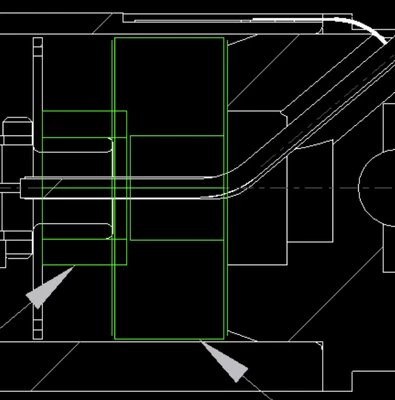
I have a section view with 2 components not showing up in view. They are there but will not appear.

I have tried excluding and including back and forth in VM States tab. I even cleared out my workspace and did the work all over again it was only a (5 minutes task)..


I also created the view state all over again. and nothing.

See screenshot of bodies in green that will not appear.

I did notice in modelling that when I try to add the parts to the section they will not select but other parts will.
Anthony_Zepeda_0-1725635113259.png


Best answer by Anthony_Zepeda

Figured it out. It was something different. Lower sub assy's had some constraint errors. But parts were locked and released. Temporarily unlocked to fix constraints in or for drawing views to update properly.

Parts will will go back to error state but for now to get my drawing to publish correctly this work around will work.

3 replies

Dale_Rosema
23-Emerald III
23-Emerald III
September 6, 2024

I've seen display issues more in regular views than section views, but are the (2) parts in question interfering/overlapping with each other?

10-Marble
September 6, 2024

No. They actually were present in the view when I originally opened. However, the view state contained extra bodies that did not need to appear in the view. But when I created a new SIMPLIFIED REP the 2 parts do not show up.

Dale_Rosema
23-Emerald III
23-Emerald III
September 6, 2024

Can you check your constraints and verify that the two parts are not constrained to a part that is not in the simplified rep?

23-Emerald III
September 6, 2024

The green parts might be surface models (my surface models are magenta but you may have differenet color settings).

In the edit definition on the section, under the Options tab, select Include all Quilts. 

In the drawing, under view properties, under View Display, set Yes for Hidden Line Removal for Quilts


10-Marble
September 6, 2024

The option is greyed out.

23-Emerald III
September 6, 2024

Which option is greyed out? Under the view display in the drawing or in the section definition for Include quilts. Also, the include quits doesn't work on offset sections, only planer sections.


There may be a draiwng option, go to File - Prepare - Drawing proerties - detail options Change

Look for Show_quilts_in_total_xsecs  change the value to YES


On a section view in a drawing, surface models (aka quilts) don't section correctly by default...it's an odd thing creo does. 


I may be mistaken, they may not be surface models, so all my advice wouldn't be helpful.


11-Garnet
September 26, 2025

One other thing I want to mention for anyone else looking: if you have components in an assembly model (e.g. parts, patterns, etc.) that are failed, then the capped section cap will not show, and it will appear hollow/shell.  Fix the failed constraints, and the capped section will then properly show again.

10-Marble
September 26, 2025

GEEZ. Freaking CREO.