
15-Moonstone
May 20, 2016
Solved

WARNING: SWEPT BLEND_1 is entirely outside the model

  • May 20, 2016
  • 1 reply
  • 1747 views

I've never run into the above titled message before.  Part of me wants to ignore this, but I'm worried about possible downstream issues.

I do have the above listed SWEPT BLEND_1, but it was created entirely within the model I am building.  Why would I get a message saying that it was created entirely outside of the model?

The only thing that I can think that would cause this is that I have within my model imported a STEP model and I am referencing a number of cross section curves in sketches.  As long as my model includes the STEP import I didn't foresee any issue.  Is this why I'm getting the above issue or is there perhaps another cause to the message?


This thread is inactive and closed by the PTC Community Management Team. If you would like to provide a reply and re-open this thread, please notify the moderator and reference the thread. You may also use "Start a topic" button to ask a new question. Please be sure to include what version of the PTC product you are using so another community member knowledgeable about your version may be able to assist.
Best answer by TomU

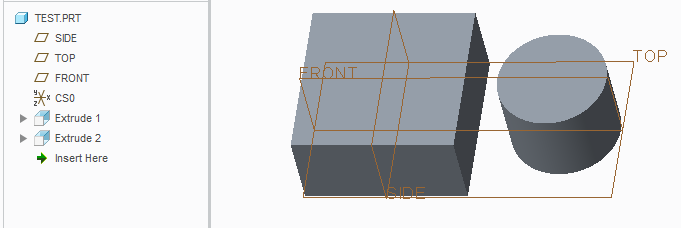
Creo will throw this message anytime you create two separate "bodies" of solid geometry within the same part.  I've never had it cause any issues.  Keep in mind that if you export this model to a STEP file and then reimport Creo will assume it's an assembly instead of a part (but you can override this).

1 reply

TomU23-Emerald IVAnswer
23-Emerald IV
May 20, 2016

Creo will throw this message anytime you create two separate "bodies" of solid geometry within the same part.  I've never had it cause any issues.  Keep in mind that if you export this model to a STEP file and then reimport Creo will assume it's an assembly instead of a part (but you can override this).

pimm15-MoonstoneAuthor
15-Moonstone
May 20, 2016

Awesome!

I must have received this message before but just not noticed.

Yes, I can see that if it was exported that it would likely be seen as 2 separate parts.  Perhaps that's why it says that it is entirely outside of the model.

By the time I'm finished this message will disappear.  It's good to know that it's nothing to be concerned about.
