
1-Visitor
November 28, 2012
Question

Welding note issues

  • November 28, 2012
  • 2 replies
  • 7851 views

Below is a screen print of a welding note that I am trying to fix. It seems that Creo puts a "1" at the end of the tail for some reason that I can not delete. To be honest, I'm not sure how I finally got the weld procedure "GTAW" to show up in the note, but it will not delete the "1:". Does anyone know how to do this? Also, is there a way to turn on or off the depth, gap and distance dimensions also shown?
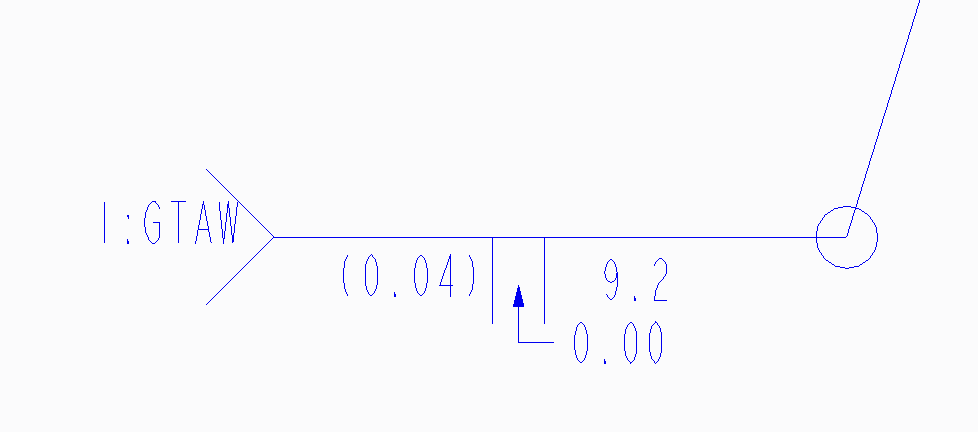
Welding+note.png


This thread is inactive and closed by the PTC Community Management Team. If you would like to provide a reply and re-open this thread, please notify the moderator and reference the thread. You may also use "Start a topic" button to ask a new question. Please be sure to include what version of the PTC product you are using so another community member knowledgeable about your version may be able to assist.

2 replies

17-Peridot
November 28, 2012

Not sure what version you are on but in Creo, it is a custom symbol. If you select it, it should open the symbol dialog. Grouping determines what is shown and the variable text allows you to change the values.

The 1:GTAW is probably from manually editing the /reference/ variable.

If this is Pro/E V5 or before, I am not sure how you interface with the symbol.

1-Visitor
November 28, 2012

I am using Creo. The field "variable text" is where I seem to have the problem. It is grey'd out and can not be manipulated.

Welding+note+2.png

17-Peridot
November 28, 2012

Oh, that is sad

Is this the case if you turn off the reference in grouping and then re-apply it? I noticed everything is cleared if you switch "sides" in Grouping.

What if you place a new symbol?

If a new symbol also doesn't work, then someone locked the properties of /reference/. What is under dependencies?

For some reason, you have a Dependencies tab that I don't get on my screen. I created mine in the drawing, not in the model.

1-Visitor
July 31, 2013

Are you, by chance, using the built-in weld symbols that are automatically created from the welding module/application in Creo?

1-Visitor
August 1, 2013

yes, im using the built in symbol...