1-Visitor
July 2, 2010
Solved

WF5 selection highlighting changes - hidden entities highlight now :(
  • July 2, 2010
  • 11 replies
  • 8739 views

highlite-selected.pnghighlite.png

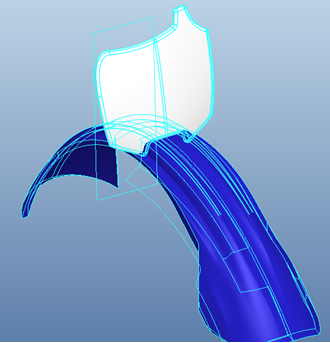
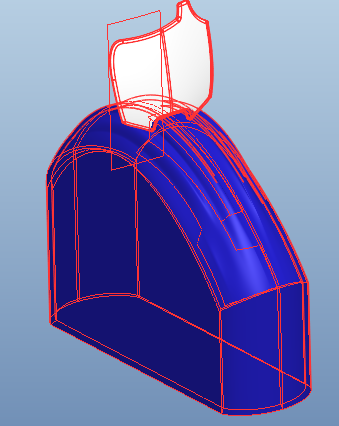
Which component is selected here? (white or blue?)

Has anyone else noticed that in WF5 if you highlight or select a component in an assembly it highlights all the hidden entities? This is a real nuisance in top down design with components that have Ext. Copy Geoms of other components. When you select or preselect the component it is hard to tell which component you have selected. Pre-WF5 it does not do this, only the shown geometry is highlighted.

Any fixes out there?

WF5 M030


This thread is inactive and closed by the PTC Community Management Team. If you would like to provide a reply and re-open this thread, please notify the moderator and reference the thread. You may also use "Start a topic" button to ask a new question. Please be sure to include what version of the PTC product you are using so another community member knowledgeable about your version may be able to assist.
Best answer by pwyndham

I looked through the config options and could not find anything. I would have to say this is a issues that should be logged with Tech Support. It is very repeatable so they should be able to correct it.

I think you selected the White part.

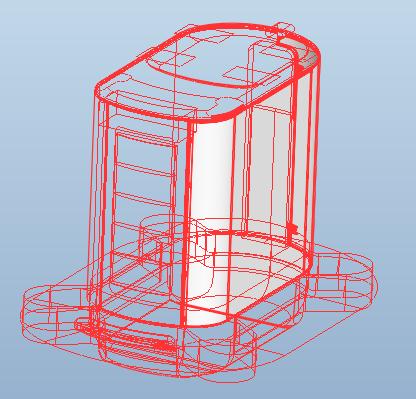
Here is my part.

highlight.jpg

Which one do you think I selected: the white one or the one that is not in this assembly?

I could log this with PTC tech support if you want.

11 replies

pwyndham1-VisitorAnswer
1-Visitor
July 2, 2010

I looked through the config options and could not find anything. I would have to say this is a issues that should be logged with Tech Support. It is very repeatable so they should be able to correct it.

I think you selected the White part.

Here is my part.

highlight.jpg

Which one do you think I selected: the white one or the one that is not in this assembly?

I could log this with PTC tech support if you want.

vmcdaniel1-VisitorAuthor
1-Visitor
July 2, 2010

I will log a call. I say the more the merrier to get abuz going. I'll post my call number when I get one in.

12-Amethyst
July 7, 2010

Vaughn,

Please keep me posted on this one.

Regards,

Brian

vmcdaniel1-VisitorAuthor
1-Visitor
July 8, 2010

Video Link : 1275

Call logged. # C7776726

See attached .zip

vmcdaniel1-VisitorAuthor
1-Visitor
July 9, 2010

You opened Call 7776726 with PTC Technical Support on 08-Jul-2010, with the following description:

"Hidden geometry of components displays in assembly when component is prehilighted."

After further investigation, I have filed Software Performance Report (SPR) #1998763 so that our Development team can investigate this issue further. This SPR has been filed with 3-HIGH severity.

When an SPR is submitted, Technical Support assigns a severity to the SPR and notifies you of the SPR number issued for your call. Additional details on the Call and SPR process can be found in the Customer Service Guide available on the PTC Website:

http://www.ptc.com/support/cs_guide/index.htm

12-Amethyst
July 9, 2010

Vaughn,

Good stuff, thanks. I’ll try to keep an eye on this, but ping me if you’re not getting the response you want.

Brian

12-Amethyst
February 18, 2011

Good news on this one folks. The issue has been resolved in Creo Elements/Pro 5.0 M070, which shipped on 12/9.

Best Regards,

Brian

12-Amethyst
February 18, 2011

Oops, I just realized that you figured that out already! Anyway, it still felt good to report that the problem was fixed! Enjoy!

Brian