
15-Moonstone
Dec 17, 2021 6:14 PM UTC
Solved

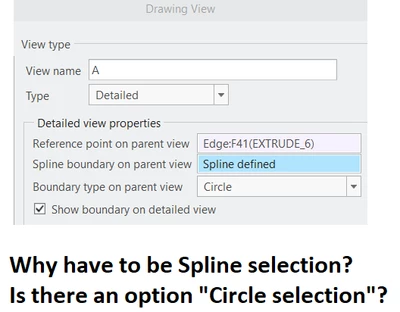
Where is the simple and efficient Circle option in defining the boundary of a detailed view?
JS_9824412_0-1639764249565.png

Click, click, click, click, click, click, click, click, click, click, click, click, click, ... REDO! Need more clicks in order to make the boundary line smooth. 


Is there an alternative to the mainstream "circle" selection in CREO? Most of the time, we only need a circle to focus and zoom into details. 


Thanks.

JS

p.s. If there is "circle selection" for defining the boundary of a detailed view, we will never use again the "Spline selection". (CREO's possible response: R U threatening CREO? We love Spline! In order to make you love and use Spline, we will never give you "circle selection" option!)


Thanks.

15-Moonstone
Dec 27, 2021 7:48 PM UTC

It appears that no acceptable solution is available. PTC should design this "circle selection" option. "love your enemy" doesn't mean our pain (of using lousing tools) should be ignored forever. The person who promoted "love your enemy" was born on 12/25.

16 replies

tbraxton
22-Sapphire II
Dec 17, 2021 10:17 PM UTC

Select a reference point on the parent view and then select 3 points that enclose the reference point, and you will get the circle as seen here. The spline select is used in case one desires to define a freeform boundary for the detail in the parent view.


tbraxton_0-1639779252380.png


Translate
24-Ruby III
Dec 18, 2021 10:03 AM UTC

@tbraxton wrote:

Select a reference point on the parent view and then select 3 points that enclose the reference point, and you will get the circle as seen here. The spline select is used in case one desires to define a freeform boundary for the detail in the parent view.


tbraxton_0-1639779252380.png


Hi,

I think OP has to click mouse 1000 times because he wants to see an outline similar to circle in detail view. If he clicks 3-times he gets polyline as outline.

I think OP expects that Creo enables user to select reference point and enter circle diameter.

Translate
KenFarley
21-Topaz II
Dec 20, 2021 12:02 PM UTC

Martin's interpretation is exactly what I thought, and also the reason when I do detail views it's an iterative process on the spline definition. I want the outline of the geometry in the detail view to be a nice circular shape that matches the circle on the view. I do this with elliptical views as well. Is it a bit particular on my part? Yes.

Also, I've always wondered the same thing as the original author. Why is a spline the only option for the selection? Additionally, and I know this is probably going to get me branded as a heretic, why isn't there an option for a rectangular selection, too? I could almost see the options as being a special case if someone only selects two screen positions for the "spline", they could either be the corners of a rectangle, or the center and edge of a circle...

Translate
tbraxton
22-Sapphire II
Dec 20, 2021 1:33 PM UTC

This request for enhancement has been submitted to PTC previously. This is one example from 2012. You need to make sure it gets to the detailing technical committee and continue to press PTC to implement it. The TCs are the best possibility of getting enhancements on the product roadmap.


https://community.ptc.com/t5/Creo-Parametric-Ideas/Allow-use-of-a-center-radius-circle-instead-of-a-spline-when/idi-p/452265 

Translate
15-Moonstone
Dec 20, 2021 1:52 PM UTC

SHOCKED!


JS_9824412_0-1640007891140.png

Acknowledged for 9+ years?! Still no actions? OMG ... CREO users are really nice gentlemen!

Translate
15-Moonstone
Dec 20, 2021 2:01 PM UTC

Be alert! CREO, there are some spies or special agents (from SolidWorks or Inventor or whatever) in your organization whose mission are to stop CREO making improvement but only blame users are not good enough -:)

Translate
24-Ruby III
Dec 22, 2021 2:50 PM UTC

Hi,

I decided to practice programming in AutoIt a bit. The result of my efforts is attached.

You can reply create_spline_for_detailed_view.mp4 to see following steps:

  • start Creo
  • open a drawing
  • start create_spline_for_detailed_view.exe
  • activate Creo window
  • place the cursor in the center of the detail area
  • press F2 key
  • place the cursor on the arc of the future circle
  • press F3 key
  • it is now 10 seconds to start creating a detail view
  • activate Creo window
  • create Detailed View, select center of the detail area and wait for a while
  • once 10 seconds have elapsed, the application draws a spline curve passing through 16 points (the number of points is stored in the file pocet.txt)
  • when circular spline is finished click middle mouse button and place detailed view


Translate
tbraxton
22-Sapphire II
Dec 22, 2021 3:05 PM UTC

@MartinHanak 

Have you made any attempt to determine the minimum # of points required to get a circle boundary?

Translate
24-Ruby III
Dec 23, 2021 8:27 PM UTC

4 points4 points6 points6 points8 points8 points10 points10 points12 points12 points14 points14 points16 points16 points

Translate
JS_982441215-MoonstoneAuthorAnswer
15-Moonstone
Dec 27, 2021 7:48 PM UTC

It appears that no acceptable solution is available. PTC should design this "circle selection" option. "love your enemy" doesn't mean our pain (of using lousing tools) should be ignored forever. The person who promoted "love your enemy" was born on 12/25.

Translate