
15-Moonstone
August 10, 2022
Solved

Why are the surfaces disappeared?

  • August 10, 2022
  • 4 replies
  • 9284 views

This is my first time to create surfaces in CREO. The below is what I got: why the surfaces don't have shade?
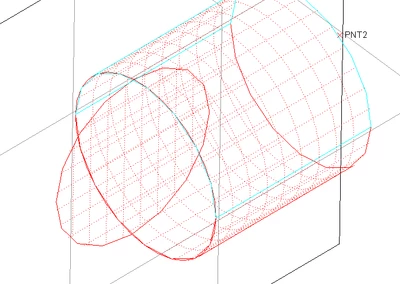
JS_9824412_0-1660151503146.png

Without clicking on these surfaces, they will disappear as like the below: why are they invisible? How to know the locations of these surfaces
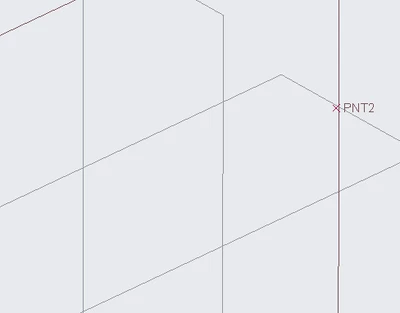
JS_9824412_1-1660151703183.png


Where is the switch to turn the surfaces on and become visible?

 

Best answer by StephenW

Not permanetly. But under the analysis tab, you can get it temporarily using Mesh surface.


4 replies

tbraxton
22-Sapphire II
22-Sapphire II
August 10, 2022

There are many things that could cause this problem.


Set the display to wire frame. If they are not visible after this then check to make sure they are not on a layer that is hidden.


If neither of these work, post your model and note what version of Creo you are using.

15-Moonstone
August 10, 2022

I am rebooting my computer. I have checked that all layers are displayed with no hide. I will check the "display to wire frame" later.


Thanks.

15-Moonstone
August 10, 2022

I haven't turn off my computer yet, so I opened CREO and the model (PRT0001.prt) again, then the surfaces appear. 


There is always some glitch in CREO.


Thanks for your time.

23-Emerald III
August 10, 2022

How are you creating your surfaces? Extrude? Style?  I tried as many flavors as I could find but none of them dissappeared.

I'm on Creo 4 m130

StephenW_0-1660155971012.png


StephenW_1-1660156010840.png


15-Moonstone
August 10, 2022

The cylindrical surface was created through Extrude. The plane surfaces were created through Fill.


Right now everything is normal. I can't find a way to make the surfaces disappear except for put them on a layer then turn the layer as hide


15-Moonstone
August 10, 2022

JS_9824412_0-1660156707549.png

I was learning how to create an isolated small surface "region" in a big surface like the small rectangular surface patch on the above enclosure. I am going to export its step file into ANSYS then mesh the small patch and name it as "leak inlet", so that it can be used in CFD simulation as an inlet BC. However, I am not sure whether this approach works.


24-Ruby III
August 11, 2022

@JS_9824412 wrote:

This is my first time to create surfaces in CREO. The below is what I got: why the surfaces don't have shade?

JS_9824412_0-1660151503146.png

Without clicking on these surfaces, they will disappear as like the below: why are they invisible? How to know the locations of these surfaces

JS_9824412_1-1660151703183.png


Where is the switch to turn the surfaces on and become visible?


Hi,

please upload your model. This the fastest way how to resolve your problem.

15-Moonstone
August 11, 2022

Good morning, Right now everything is normal.


In opposite, right now I can't find a way to make the surfaces disappear, except for put them on a layer then turn the layer as hide.

23-Emerald III
August 11, 2022

Layers are the typical way of handling visibility of surfaces.

You should also be able to RMB  Hide

StephenW_0-1660221181525.pngStephenW_1-1660221198425.png


21-Topaz I
August 11, 2022

Surface disappear randomly. This is unusual.

Can you share your graphics information by browsing File > Help > System Information

15-Moonstone
August 11, 2022