
10-Marble
December 28, 2025
Solved

Why can’t I apply Limits & Fits to dimensions in Creo 12.4 drawings?
  • December 28, 2025
  • 1 reply
  • 372 views

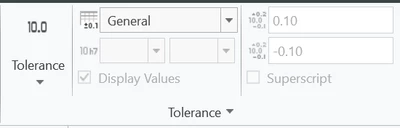
XV_10815251_0-1766911182083.png

For a school project, I need to make 2D drawings of already existing 3D parts.
Normally, I specify my tolerances (for example 10 n6) using the menu shown in the picture.
However, now I can’t do this. Is it because the files date from 2017 and were created in an older Creo version than the one I’m currently using?

Also is there a site or forum where i can let my 2D drawings be checked? i got a exam coming up and would love to have them checked but idk if that exists
How can I fix this? I am using Creo 12.4 Education.


Best answer by tbraxton

The most likely issue is that you need to load the tolerances in Creo. Follow the steps shown in this video starting 1:00 min in to load the tolerances in Creo.


PTC Creo 7: How to assign a tolerance from the ISO System of Limits & Fits to a shaft diameter

1 reply

tbraxton22-Sapphire IIAnswer
22-Sapphire II
December 28, 2025

The most likely issue is that you need to load the tolerances in Creo. Follow the steps shown in this video starting 1:00 min in to load the tolerances in Creo.


PTC Creo 7: How to assign a tolerance from the ISO System of Limits & Fits to a shaft diameter

10-Marble
December 28, 2025

Thank you! it worked wonderfully