

Patriot_1776
22-Sapphire II
September 5, 2013
Solved

Wow, here's something interesting....

  • September 5, 2013
  • 8 replies
  • 3737 views

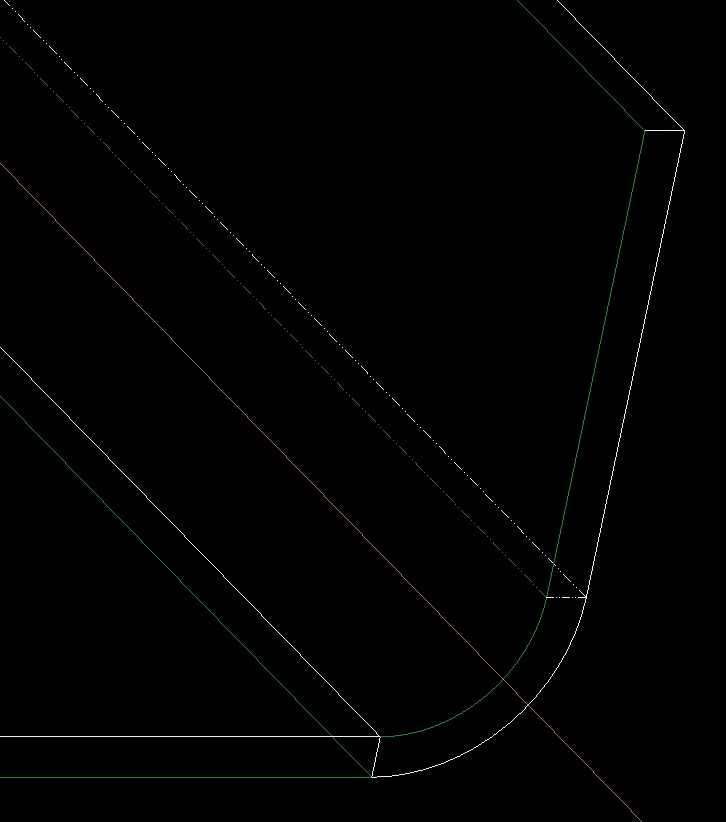
Ok, so, I'm doing some eLearning (don't really like it) to refresh myself on sheetmetal, and found something interesting: I thought that the green side was ALWAYS on on side or the other. Seems, somehow, I managed to make the green side on 2 different sides. HUH???? Anyone else ever see this?SHEETMETAL+ISSUE-01.jpg

This thread is inactive and closed by the PTC Community Management Team. If you would like to provide a reply and re-open this thread, please notify the moderator and reference the thread. You may also use "Start a topic" button to ask a new question. Please be sure to include what version of the PTC product you are using so another community member knowledgeable about your version may be able to assist.
Best answer by TomD.inPDX

Correct, it is unattached. You have 2 "distinct pieces "according to the dialog in the floating toolbar (Creo 2).

Once you Merge them, the second piece will switch the "green" side to the master selected. FYI: Merge still uses the old menu manager.

You created the second wall using extrude, and the green side was automatically the sketch profile. Not sure why the turoial drove you down this alley but normally you would create a Flat feature (next to flange).

I also noticed the use of a flange for the other bend. Again, a Flat here would suffice. Flanges are geared more towards cylinders. I learned this after a while too.

8 replies

Patriot_1776
22-Sapphire II
September 5, 2013

Oops, meant to include the actual file. I know it was what I did, but I'm surprised the software let me do it. No wonder it won't let me do an unbend......

13-Aquamarine
September 5, 2013

It's an unattached wall.

17-Peridot
September 5, 2013

Correct, it is unattached. You have 2 "distinct pieces "according to the dialog in the floating toolbar (Creo 2).

Once you Merge them, the second piece will switch the "green" side to the master selected. FYI: Merge still uses the old menu manager.

You created the second wall using extrude, and the green side was automatically the sketch profile. Not sure why the turoial drove you down this alley but normally you would create a Flat feature (next to flange).

I also noticed the use of a flange for the other bend. Again, a Flat here would suffice. Flanges are geared more towards cylinders. I learned this after a while too.