4-Participant
October 15, 2022
Solved

Z axis up

  • October 15, 2022
  • 2 replies
  • 4064 views

I find it ridiculous that we cannot choose Z as up axis.

I have tried selecting "user defined" as standard orientation, but it will only turn x and y angle.

I have tried making own template part and template assembly and replaced the standard CSYS with one that has z as top (up). But then the actual system orientation is still Y up, and my exports will still be oriented wrong anyway.


So either choose to always have my exports in wrong orientation, or always view my models from wrong standard orientation


What are your best work around for this? 😃

Best answer by tbraxton

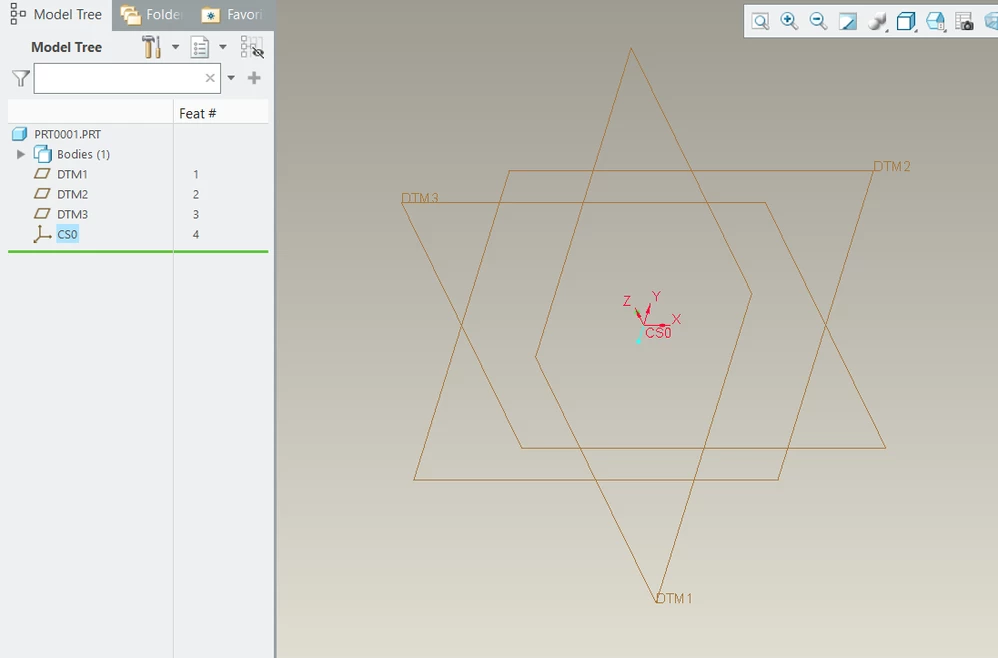
If you create a new start part, it is possible to orient the z-axis as required. Is this what you are trying to do? If so, the key is to create the default datums in an empty part before adding the csys to the model. See the model tree.

tbraxton_0-1665844362281.png


You can add CSYS features to control orientation and origin to support your workflow.  For your exports create a csys that has the z-axis oriented relative to the part geometry as required and use this csys for exports.


Use of a mapkey to create all orthographic views relative to a reference view is also very useful. The user will orient the model in a front view and then the execute the mapkey to generate all other orthographic projections for the model and save the views.


2 replies

tbraxton
22-Sapphire II
tbraxton22-Sapphire IIAnswer
22-Sapphire II
October 15, 2022

If you create a new start part, it is possible to orient the z-axis as required. Is this what you are trying to do? If so, the key is to create the default datums in an empty part before adding the csys to the model. See the model tree.

tbraxton_0-1665844362281.png


You can add CSYS features to control orientation and origin to support your workflow.  For your exports create a csys that has the z-axis oriented relative to the part geometry as required and use this csys for exports.


Use of a mapkey to create all orthographic views relative to a reference view is also very useful. The user will orient the model in a front view and then the execute the mapkey to generate all other orthographic projections for the model and save the views.


ISbitpro4-ParticipantAuthor
4-Participant
October 17, 2022

aha, so I will have to manually pick the only visible coordinate system in my model when exporting (to not default in to the invisible standard csys). Or as you say, use a macro.


Thank you for this work around! I will use it 😃

23-Emerald IV
October 18, 2022

I don't care for simply reorienting the coordinate system because the internal (hidden) default csys is still pointing the wrong direction.  I prefer to use the default csys as-is and then name the planes so they agree with it.  To get things to show correctly in Creo, change the default orientation so that z is pointing up.  This can be done with the following config options:

  • orientation
  • x_angle
  • y_angle

TomU_2-1666100573128.png

TomU_1-1666100512963.png

TomU_0-1666100440286.png


ISbitpro4-ParticipantAuthor
4-Participant
October 18, 2022

Thank you for the user defined view orientation. I will give it another try!


I tried this and at first did not like it, because I could not possibly get the orientation as I wanted. It can only rotate around X and Y and for some weird reason not Z.

This is the orientation I want.

ISbitpro_0-1666115317045.png


As you say, the internal default csys will be where it is. I will just have to learn to use Y as forward instead of side I guess...

I guess I will never understand why I have the option to add my own csys, and then Creo just ignores it and use its internal default csys anyway haha

tbraxton
22-Sapphire II
22-Sapphire II
October 18, 2022

You may want to consider leaving the default CSYS as PTC has it. You can create other CSYS features as needed with arbitrary orientations. I have seen many users struggle with this coming from systems that use a world CSYS (UG, NX).


PTC made this worse by labeling planes with names that imply orientation before any geometry exists in a model. It is a flawed paradigm in most work environments.


I have found that the issue is one of view orientation not consistent with the users' preference. If you set up view automation it resolves most of the issues with usability. If you are able to orient the model as viewed through the front orthographic projection plane and then run automation to define the other 5 orthographic views and save them, this solves 99% of the usability issues IME.


For datum reference frames just add the csys needed to support the export, assembly alignment etc.