1-Visitor
April 24, 2014
Solved

Calling trajpar wizz-kids

  • April 24, 2014
  • 3 replies
  • 5444 views

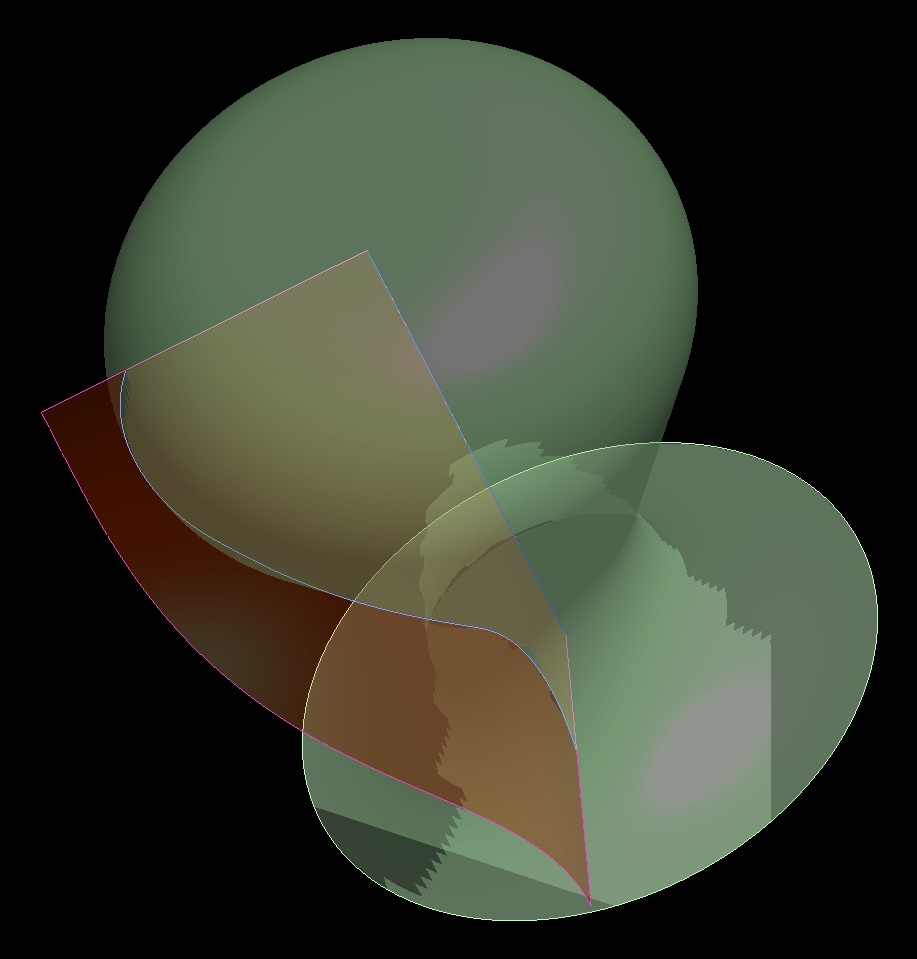
Hello, i am trying to create the curve shown in the attached image, by relation, using trajpar function. In this image the curve was simply projected onto the surface (which is a revolve), just to show what i require, but i would like to control it by relation, as mentioned already. The curve needs to turn through 75 degrees & be normal to the horizontal planes at each end. I just need someone to point me in the right direction, with how to right the relation. I am getting close, i just cannot get the normal condition on the ends. Any Ideas?

John


This thread is inactive and closed by the PTC Community Management Team. If you would like to provide a reply and re-open this thread, please notify the moderator and reference the thread. You may also use "Start a topic" button to ask a new question. Please be sure to include what version of the PTC product you are using so another community member knowledgeable about your version may be able to assist.

Best answer by Patriot_1776

For fun......

CURVE_ON_SURF_NORM_AT_ENDS-01.jpg

3 replies

17-Peridot
April 24, 2014

At 75 degrees, you will not obtain a normal on both ends... technically, that is 180 degrees of phase to obtain that.

What I think you -are- trying to tie the 75 degrees to is the wrap angle around your object, and this is easily enough to accomplish.

the trajpar in this case is a sin/cos function. Technically, a cos() because you want a tangent end (to vertical). Your sign sweep is 180 degrees; your amplitude is whatever makes the project cover 75 degrees around your object. For that you place points at your endpoints and capture a measurement that can be used in your curve sketch relations.

Simple remember a few things... your amplitude is the horizontal distance... while the cos() function will swing from -1 to 1. Add the math to get the appropriate amplitude based on the horizontal measurement (you can do some math here too but it is not directly cylindrical so you have to know the diameter at each endpoint).

Open trajpar features are values from 0-1, however, cos and sin versions require the angle. The angle will be the value from (0 to 1) * 180

Do be careful, however... this is still a projected sine curve and it will not be accurate at any angle other than the projected angle. A wrap will be different as well and will require different math. In order to make is a sine curve along the surface, you will have to use some extra techniques and a different approach.

17-Peridot
April 24, 2014

This might help:

Cosine Calculator

open-vs-closed_trajectories.JPG

14-Alexandrite
April 24, 2014

I do not 100% understand what you are asking.

Is the red line going to be a trajectory for something on the side of the revolve?

Or are you talking about the blue line?

1-Visitor
April 24, 2014

Yes, the red curve is what I am after, & yes, it will be a trajectory for a sweep on the revolved surface. Sorry for the confusion.

John

17-Peridot
April 24, 2014

Spoiler Alert! ...this is what I came up with:

trajpar_challenge.PNG

Patriot_1776
22-Sapphire II
April 24, 2014
17-Peridot
April 24, 2014

I knew I could count on you to think outside the box, Frank

Patriot_1776
22-Sapphire II
April 24, 2014

I've been told sometimes I'm not even on the same PLANET! Is my "Colorado" showing? LOLZ

I totally suck at math, so I avoid it when I can! I think more in images, geometry. Too bad we don't live in the same area, I think we would make an AWESOME team if we were to do a start-up!