1-Visitor
July 11, 2016
Solved

Constrains question in assembly and the unnecessary shown of the datum plane

  • July 11, 2016
  • 5 replies
  • 4249 views

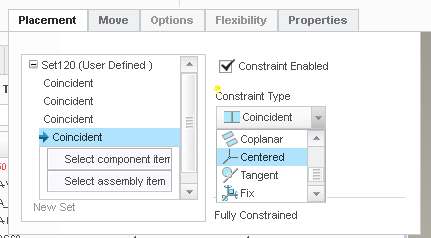
I want to add constraints, can be contact or distance,  in assembly using two sphere surface, (both surface with same DIA). But looks like  it does not work, please see picture. Any one can help?

One more question is , in the same assembly. There are some datum plane showing on the screen. They are from the component level when I worked on the detail drawing. Can I make these datum no-shown in assembly model or even in component as well?

Thanks.


This thread is inactive and closed by the PTC Community Management Team. If you would like to provide a reply and re-open this thread, please notify the moderator and reference the thread. You may also use "Start a topic" button to ask a new question. Please be sure to include what version of the PTC product you are using so another community member knowledgeable about your version may be able to assist.

Best answer by StephenW

For the assembly constraint, preselect the CENTERED constraint before selecting the spherical surfaces.

5 replies

StephenW23-Emerald IIIAnswer
23-Emerald III
July 11, 2016

For the assembly constraint, preselect the CENTERED constraint before selecting the spherical surfaces.

yguo1-VisitorAuthor
1-Visitor
July 11, 2016

Actually, I want to make these two sphere surface contact each other.

yguo1-VisitorAuthor
1-Visitor
July 11, 2016

Actually, I want to make these two sphere surface contact each other.

1-Visitor
July 12, 2016

You can use point on point (the center of the spheres)

You can try [Tangent]

1-Visitor
July 12, 2016

Regarding showing datum planes:

You can hide them using Hide planes

You can place all datums with rules on layers.

Then using Layer Tree you can hide them on part, drawing or assy level.

1-Visitor
July 12, 2016

For datum planes, if you link them to a tolerance box, they do not appears in assembly. But sometimes they appears in the drawing and you have to "erase" them.

yguo1-VisitorAuthor
1-Visitor
July 12, 2016

I defined the datum plane in drawing. And I do not really need them shown in 3D, but these planes do show in the component level then shown in the assembly. I erased them in part but the other day I open the file, they show up again. 

yguo1-VisitorAuthor
1-Visitor
July 12, 2016

Yes. You're right.