1-Visitor
March 1, 2018
Question

constraint attach

  • March 1, 2018
  • 4 replies
  • 4341 views

Hello,

I use Creo 4, in the drawing

when I move a note or a bubble, there are always positioning constraints that appear, is there a way to disable this function?

Someone can help me ?


thanks
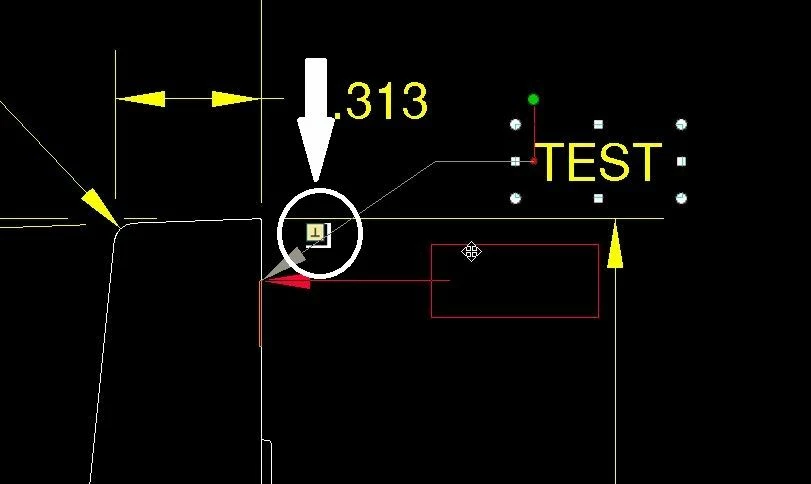
 

contraint_attach.jpg

4 replies

Mahesh_Sharma
22-Sapphire I
March 1, 2018
1-Visitor
May 24, 2018

Why does the link to vote is disable ?

Dale_Rosema
23-Emerald III
23-Emerald III
May 24, 2018

Are you logged in? I don't think you can vote if you are not logged in.

mgrondin11-VisitorAuthor
1-Visitor
February 26, 2019
 
to remove the constraints for bubble :
edit the attach, use a surface and change the arrow style to another simple arrow.
the simple arrow does not work well.
 
mgrondin11-VisitorAuthor
1-Visitor
February 26, 2019

It does not solve the problem, but it's an observation I made !

17-Peridot
February 26, 2019

Another possible work around is by creating vertical and horizontal snap lines.

Have their intersection away from those pesky perpendicular or tangent snapping conditions.

Snap the corner of the leader to both lines, then move the lines into desired position by adjusting their spacing (can double click the snap line)

1-Visitor
July 8, 2021

I found using surface reference selection instead of edge will stop the constraints.

kdirth
21-Topaz I
21-Topaz I
July 9, 2021

This issue was fixed in May 2020 with the release of 4.0 M130 with the addition of controls  to disable and change the behavior of the constraints.


Check out this Idea post for more info: Option to disable/turn off annotation leader snapp... - PTC Community


There is always more to learn.
