
13-Aquamarine
October 27, 2014
Solved

Contact convergence when no contact required?

  • October 27, 2014
  • 2 replies
  • 2232 views

Question for the Analysis gurus:

If I run an analysis with contact enabled, is it possible for it to converge if none of the contacts are actually required for equilibrium?

For the sake of illustration, let's say that I'm modelling a spring device with an 'end stop' controlled by a contact; but in fact the load applied to the spring doesn't (shouldn't) cause it to deflect far enough to make contact with the end stop.

Will this converge happily, or does the convergence depend on at least one contact being 'engaged' - will Mechanica try to somehow create a contact condition even though the load doesn't require it?


This thread is inactive and closed by the PTC Community Management Team. If you would like to provide a reply and re-open this thread, please notify the moderator and reference the thread. You may also use "Start a topic" button to ask a new question. Please be sure to include what version of the PTC product you are using so another community member knowledgeable about your version may be able to assist.
Best answer by mlindqvist

If you run the analysis with "large deformation" enabled, I would think it works, provided rigid body motion is prevented by constraints.

(*doing a quick test*)

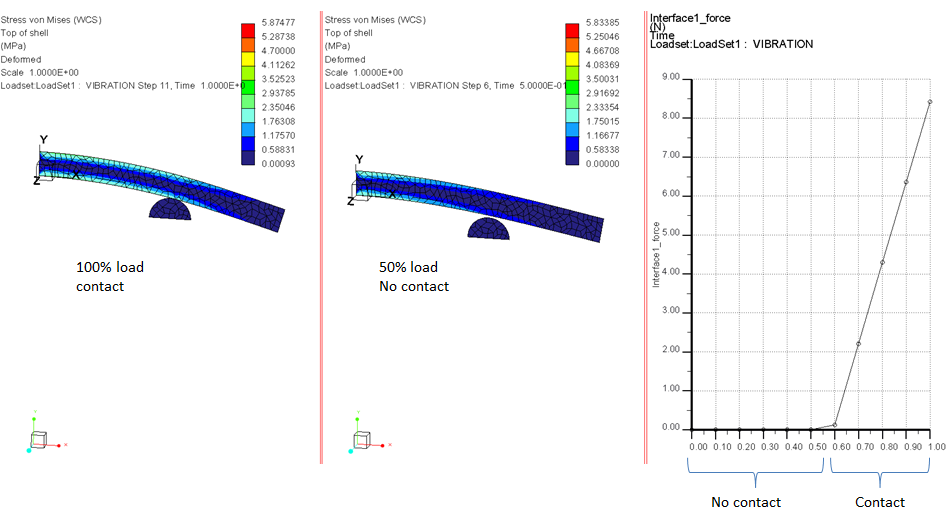
Yes it works fine if you enable large deformations, and make sure rigid body deformation is enabled... here is a test I did:

Capture.PNG

2 replies

2-Explorer
October 27, 2014

It shouldn't. For contact convergence, the solver adjust the stiffness of the contact springs to minimize penetration between components. In your case, the solver should converge on a stiffness of nearly 0.

1-Visitor
October 29, 2014

If you run the analysis with "large deformation" enabled, I would think it works, provided rigid body motion is prevented by constraints.

(*doing a quick test*)

Yes it works fine if you enable large deformations, and make sure rigid body deformation is enabled... here is a test I did:

Capture.PNG

13-Aquamarine
October 29, 2014

Hmm... Large Deformations is greyed out for me. Is that a licence thing?

1-Visitor
October 29, 2014

It might be, you will need the advanced version of Creo Simulate, and you need Creo 1 or later. Contact combined with large deformation was implemented in Creo 1. Or your model might contain beam or shell elements. You can't use "large deformation" analysis if your model contains beams/shells.