Hi @Srivalli ,
This is mostly covered in my previous response, but I can clarify a couple things. The license PROE_DesignAdvP already includes Mechanism dynamics so there is not a need to attach that as an additional extension. Once all the PROE_DesignAdvP licenses are taken the next license attempted is PROE_DesignEssH. There is a problem there because that license is a locked license for home use and should not be placed on the license server. I don't think it will let you have that license from the server, but I am not sure. I am now assuming the next license it will attempt is DesignAdvG. I am not totally familiar with this but it looks like its the Tier2 but allowed to be used globally instead of regionally. It appears that only once these are all taken, then the next license DesignAdvPG will be another license(s) that has the mechanism dynamics option.
These are taken in order. The order can be changed by the right arrows. But, as I stated in my previous post it is better to have control over which license type is granted rather than first come first serve.
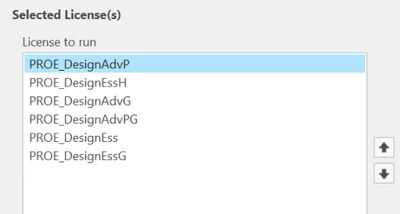
I would have a Tier1 startup configuration with the local DesEss first and the global DesEssG next.
Then I would add another Tier3 startup configuration with DesignAdvP followed by DesignAdvG.
I would do this for every user and tell them to only grab Tier3 when they need that functionality.
System Information one way to tell what license you actually have obtained.
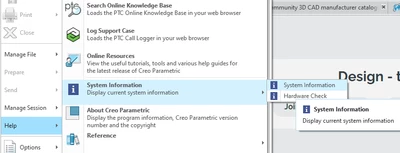
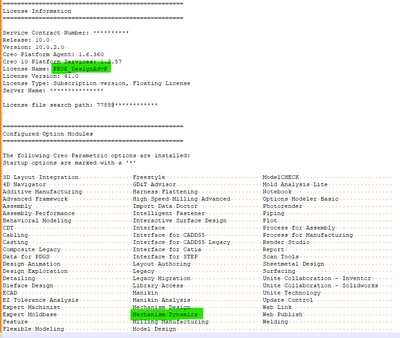
Finally, and probably your most important tool is the PTCSTATUS command.
For this open a command prompt and change directory to the bin folder such as C:\Program Files\PTC\Creo XX.X.X.X\Parametric\bin.
then type ptcstatus and you should get a listing of all the licenses on the license server, how many are available and who is using them.
To facilitate this I have my users modify the machines environment variable "path" to add the path to that bin folder so the ptcstatus command can be run at the root path or any path and eliminate the change directory step. we collaborated here to write a little tkinter python app to make the ptcstatus output more graphical along with some launch options. It also has the ability to notify us when a license becomes available. We can also see who the user is and contact them about possibly switching licenses.
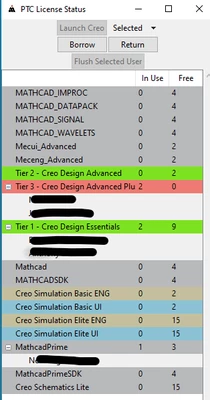
These are all changes that are on the client sides (your personal machines) not the server, that make licensing clear and organized.
Hopefully this has clarified some things for you. Please let us know if there are further questions.

