16-Pearl
July 20, 2023
Solved

Creo simulate amount of elements on beam

  • July 20, 2023
  • 2 replies
  • 1906 views

How to define amount of points on the beam so i can plot better graphs.
ilyachaban_0-1689860182829.png

All my attempts failed because i have only 5 points on beam and don't know how to increase the amount of points with which creo works. 

I was using graphing tool from simulate results and it didn't allow me to create or interpolate thru existing points. (better way to do it woulde be to create actual points in mesh with which creo will calculate actual simulation)

But how to do it?

 

Best answer by skunks

2023-07-20_beam.png

2 replies

skunks19-TanzaniteAnswer
19-Tanzanite
July 20, 2023

2023-07-20_beam.png

17-Peridot
July 20, 2023

Thanks @skunks ...and If you need 200 points instead of 10?

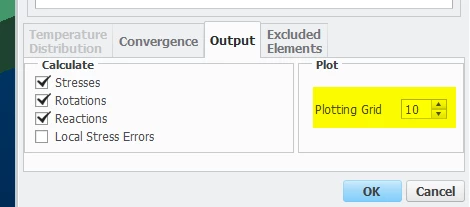
You can define your beam from a pattern of points for any arbitrary resolution. If you use plotting grid = 10 there will be 10 data points between each point. 20 segments x 10 plotting points = 200 plot points.

SweetPeasHub_3-1689887828972.png


Plot along beam, stress, displacement, etc. like this (chose the beam to plot)

SweetPeasHub_1-1689887743459.png


can save the graph data to excel

SweetPeasHub_2-1689887767953.png


If a curved beam, define as one curve but have many segments in the curve.

You will get 10 data-points for each of those purple arrows.

SweetPeasHub_4-1689888242461.png

SweetPeasHub_5-1689888279238.png

SweetPeasHub_6-1689888375916.png

11 segments x 10 plotting points = 110 points


-edit  Also you can of course plot by X coordinate etc.

SweetPeasHub_7-1689889012646.png


-regards


19-Tanzanite
July 21, 2023

yes, you are right.

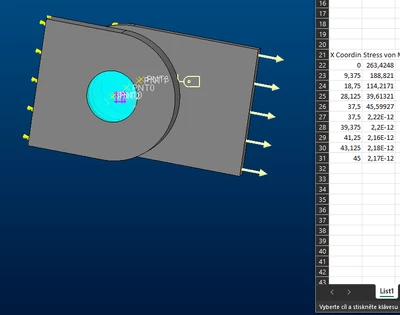
-> my example att.