

Creo Simulate: Contact analysis issue
Hello Team,
I am trying to run the non-linear analysis for assembly with contacts. After running every time, it gives below error, can you please advise, what can be possible solution to this?
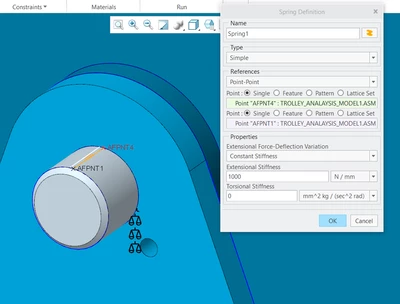
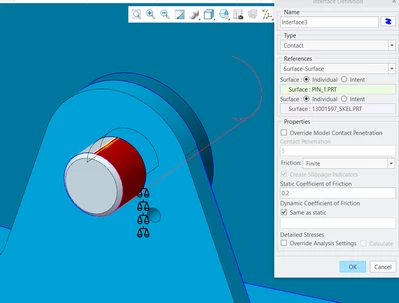
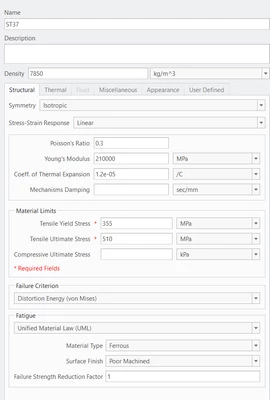
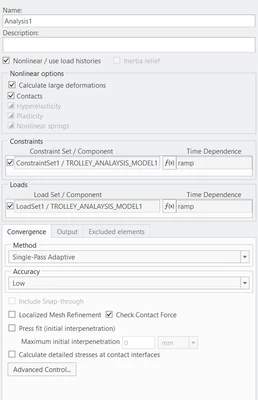
Below are some snapshots to show the model i have setup:
For Pin connection:
Material:
Analysis type:
-------------------------------------------------------
Creo Simulate Structure Version P-70-52:spg
Summary for Design Study "Analysis1"
Mon Oct 23, 2023 08:15:36
------------------------------------------------------------
Run Settings
Memory allocation for block solver: 16000.0
Parallel Processing Status
Parallel task limit for current run: 16
Parallel task limit for current platform: 64
Number of processors detected automatically: 16
Checking the model before creating elements...
These checks take into account the fact that AutoGEM will
automatically create elements in volumes with material
properties, on surfaces with shell properties, and on curves
with beam section properties.
Generate elements automatically.
Checking the model after creating elements...
No errors were found in the model.
Creo Simulate Structure Model Summary
Principal System of Units: millimeter Kilogram Sec (mmKs)
Length: mm
Mass: kg
Time: sec
Temperature: C
Model Type: Three Dimensional
Points: 73628
Edges: 389465
Faces: 567484
Springs: 2
Masses: 0
Beams: 0
Shells: 0
Solids: 251795
Elements: 251797
Contacts: 44
------------------------------------------------------------
Standard Design Study
Static Analysis "Analysis1":
Contact Analysis
Large Deformation Analysis
Convergence Method: Single-Pass Adaptive
Plotting Grid: 4
** Warning: Two faces (DBIDs: 1801804 & 1801860) on opposite
surfaces in a contact (DBID: 1194308) are
connected at a node (DBID: 1313858). This prevents
the surfaces from moving completely apart during
a contact analysis. If this is not what you
intended, please edit your model appropriately.
Convergence Loop Log: (08:17:39)
>> Pass 1 <<
Calculating Element Equations (08:17:40)
Total Number of Equations: 4260133
Maximum Edge Order: 3
Solving Equations (09:18:35)
Time Step 2 of 6: 2.00000e-01
The design study terminated abnormally.
The nonlinear iteration did not converge for the
time value: 1.95313e-04
o The model may have a buckling mode with a load factor
smaller than this value. You may determine the smallest
(linear) buckling load factor by running a buckling
analysis.
o The deformations may be large enough that you must
further refine the mesh. To locate potential problem
areas, it may help to run an analysis with reduced
loads and examine the deformed shape of the model.
o The model may have a static instability.
o It is possible that the load is too large for the model's
material or the model is insufficiently constrained. Check
the constraints and material properties, or reduce the maximum load.
------------------------------------------------------------
Memory and Disk Usage:
Machine Type: Windows 64
RAM Allocation for Solver (megabytes): 16000.0
Total Elapsed Time (seconds): 11953.31
Total CPU Time (seconds): 100006.30
Maximum Memory Usage (kilobytes): 21189013
Working Directory Disk Usage (kilobytes): 28891140
Results Directory Size (kilobytes):
943948 .\Analysis1
------------------------------------------------------------
Run Completed with Fatal Error
Mon Oct 23, 2023 11:34:49
------------------------------------------------------------