1-Visitor
July 13, 2017
Solved

Creo Simulate dynamic random simulation analysis output PSD

  • July 13, 2017
  • 1 reply
  • 4160 views

Hi everyone,


I am trying to run a payload random vibration analysis in Creo Simulate of the cubesat rails with the top plate and two root actuators that deploy one panel. I have defined the PSD table with frequencies ranging from 20-2000Hz and ASD levels in (g^2/Hz) as uni-directional translation in the (1,1,1) direction. I have 2 problems:

1. When I try calcuating deflections of the panel, I get absurd values which are 1/3rd the size of the panel.

Do you have any suggestions on what I could be doing wrong? I know that's not a lot of information but I am open to ideas.

2. I need to get the output PSD response. I can't figure out how to get that. Can somebody help with that? 

Best answer by Chris3

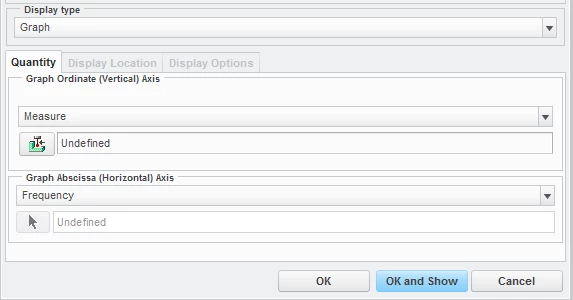
In the simulate results, change the disply type to graph and then change the quantity to measure. Then click the measure icon to the left of "undefined" and pick your measure.


Capture.PNG

1 reply

Chris3
21-Topaz I
July 14, 2017

You should setup an acceleration measure at the base of your input to verify that the output is the same as the input. This is a basic check.


I don't think you want 1,1,1. This would apply the PSD in all directions at once. Industry standard is to apply to each direction individually (ie three seperate studies 1,0,0; 0,1,0 and 0,0,1)


You output PSD using measures. You need an acceleration measure.

https://learningexchange.ptc.com/tutorial/541/using-measures

ykathur21-VisitorAuthor
1-Visitor
July 14, 2017

I was able to successfully set up measures but I can't figure out how to obtain the information stored in measuers as a plot. Since I am trying to study the effects of the vibration on the panel as a function of frequency, would it be possible to output such information? If so, how do I do it? 


Thank you for all the help!

Chris3
Chris321-Topaz IAnswer
21-Topaz I
July 14, 2017

In the simulate results, change the disply type to graph and then change the quantity to measure. Then click the measure icon to the left of "undefined" and pick your measure.


Capture.PNG