
4-Participant
May 8, 2024
Solved

how to convert mpj, .rwd , .rwt, .pvs or .html format to excel

  • May 8, 2024
  • 2 replies
  • 2434 views

Hello all, 
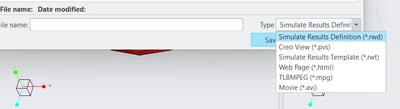
I am facing a problem related to the conversion of my files to the Creo Parametric 9 version. Currently, this version of Creo only allows you to change its results into the following formats:
RK_10997462_0-1715190457796.png


I want to convert my analysis results from these above formats to Excel format. I tried surfing online regarding the same but couldn't find it. If anyone can help me, then I request that person offer me that information to convert those results into readable text or Excel format.

Thank you,
Rushang
Best answer by SweetPeasHub

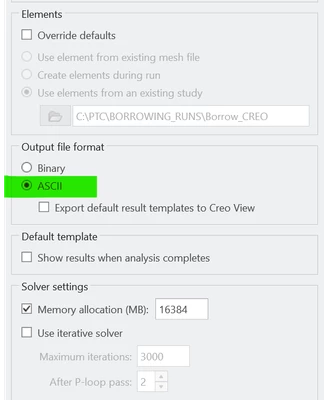
The answer is that all versions of Creo Simulate allow ASCII output format.

SweetPeasHub_0-1715195947416.png


The output folder will have human readable text, however the format is complex. Even though your question does not ask about interpreting the text output, I will answer that with a link to the question where this was answered best.


https://community.ptc.com/t5/Analysis/how-do-I-output-element-stresses-strains-in-tabular-format-in/m-p/386934/highlight/true#M4365


 "Interpreting Pro_MECHANICA Structure ASCII Output Files.pdf"  is the Key to this further question.


2 replies

Chris3
21-Topaz I
May 8, 2024

Those results are visual results (ie modal animations or fringe plots). If you want the result of something (ie max stress or displacements, etc) then you need to setup a measurement. The measurements get put into the result .rpt file as text. Depending on your measurement (for instance if you are doing a transient measurement) there is a way to save it directly to Excel from the output graph dialog box.

4-Participant
May 9, 2024

thank you very much chris for responding quickly, it would be great if you could please explain the whole process to setup the measurements.


17-Peridot
May 8, 2024

The answer is that all versions of Creo Simulate allow ASCII output format.

SweetPeasHub_0-1715195947416.png


The output folder will have human readable text, however the format is complex. Even though your question does not ask about interpreting the text output, I will answer that with a link to the question where this was answered best.


https://community.ptc.com/t5/Analysis/how-do-I-output-element-stresses-strains-in-tabular-format-in/m-p/386934/highlight/true#M4365


 "Interpreting Pro_MECHANICA Structure ASCII Output Files.pdf"  is the Key to this further question.


4-Participant
May 9, 2024

thank you so much for the reply. But i want the data in X, Y, and Z coordinates. Using this method, can I get the tabular form of the data where X and Y are the coordinates of the model and Z is the deformation.??