15-Moonstone
March 7, 2022
Solved

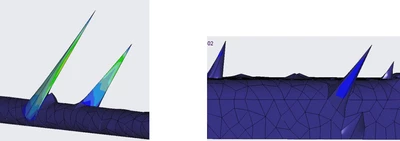
How to get rid of "Spikes" - inaccurate VM stress calculations in Simulate?

  • March 7, 2022
  • 1 reply
  • 10740 views


JS_9824412_1-1646688107228.png

See above screenshot, the spikes of stress calculations among shell elements. Does anyone see this before?! The stresses should be less than 20ksi, however, these spikes are around 2.0e+7 ksi. I am using Simulate 6.

Best answer by pausob

I don't have an answer but point out that it is very possible that there are bugs in any software...

However, this thread and your examples do make me remember an old discussion from few years ago.  In it, (in no small part due to how PTC handled it), I developed severe mistrust in Creo Simulate FEA capabilities:

Non-symmetric results for symmetric model and load? 

Disclaimer: I don't have maintenance, so I can't track if the SPR 2258467 has been closed.  I have to say that it seems to me that PTC has gotten better lately, so I'd be curious if there was a resolution to a very basic issue that somehow got past PTC QA and made it to a released product costing $$$

1 reply

17-Peridot
March 8, 2022

Please give us more information. If you can attach a zip file that would help greatly. My only comment on the images is that the elements look strangely shaped.

15-Moonstone
March 8, 2022

JS_9824412_0-1646750087359.png

The image on the left side shows the shell elements of a metal bracket of thickness 0.1". The image on the right side shows the von Mises stress distribution in the latest simulation just now. There is no more "spikes" shown in yesterday's post. 


It never happened before according to my limited memory. 


On yesterday afternoon, when the "spikes" showed up, Simulate popped up a message "Fatal error encountered", then quitted.


Today, this is no error message.

15-Moonstone
March 8, 2022

The traceback.log about yesterday's incidence is attached here.