How to interpret Section Thickness measurement
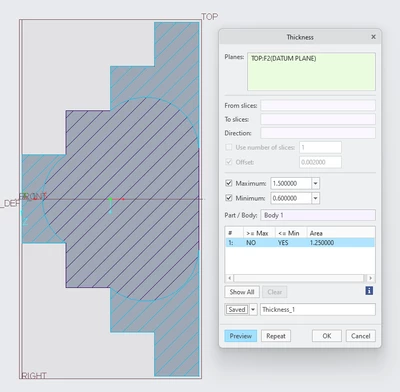
I am learning about various analysis tools in Creo 10.0.4.0, and can't seem to find a specific explanation of how the 'Section Thickness' tool works. I (think) the related Thickness tool works by ray-tracing a perpendicular line through every surface, and expected the Section Thickness tool must work similarly, except I'm struggling to interpret the highlighted regions it produces in order to assert where those lines are.
In the screenshot below, I have created a model with a revolved section around the bottom of a sketch that looks like a 4-step staircase, 1 inch long with 0.25 inch steps. I have set the maximum and minimum thicknesses to 1.5 and 0.6, so from the geometry, I expect the last step should have some indication that, measured from top to bottom, it is 2 inches long. However, we only get these minimum sections highlighted, which obviously correspond to areas that would be under minimum, but I still struggle to understand how those lines are traced out.