6-Contributor
August 13, 2023
Solved

Unable to get dynamic properties

  • August 13, 2023
  • 2 replies
  • 4898 views

Hello,

I'm working on my first mechanism and I'm facing some issues.

I set up all the servomotors and set a sequence for a position analysis, but all the motors move together in a while.

So, I wanted to set a velocity profile but when I start the analysis I get errors and cannot perform it.

I checked some videos and I guess I have to define the dynamic properties, but in the slider connection /translation the box isn't visible.

I'm using Creo 9.0.5.

Thanks,

Giovanni


Best answer by SweetPeasHub

Thanks! This is much more specific and very good for getting useful help from the community,

The problem is your analysis is forcing the position outside of the travel limits.

at 600 mm/s you will reach 410mm in 0.683333 seconds, but you ask to go for 1 second with only 10 frames.(0.1s,0.2s,0.3s...)

At 0.6 seconds a frame is made and the travel is 0.6*600 = 360mm. At 0.7*600 = 420 mm >410mm so an error and only the previous frame at 0.6s was successful. If you did 100 frames the last success would be at 0.68 seconds =408mm.

A couple more tips...

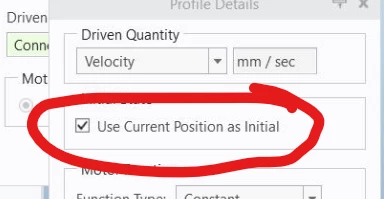
Current Position as Initial means wherever you last left the model.
SweetPeasHub_0-1692109415743.png


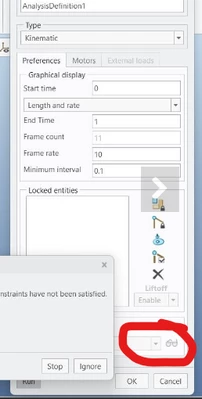
It is better to set your analysis with an initial condition that starts with a snapshot with the configuration at the true beginning. (circled, looks blank to me)
SweetPeasHub_1-1692109509397.png


Another way is to control the position rather than the velocity. This way the initial position/condition does not matter and can be left blank.

I would use driven quantity position and function type table and have two lines like so.

time, position

0, 0
1, -410


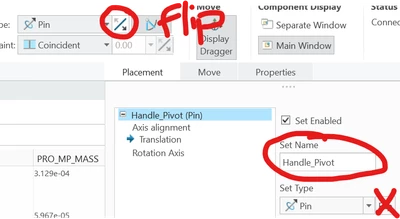
I would try to change the direction so it travels positive 410 rather than negative. There is a flip direction for the initial connection definition. The slider arrow points in the positive direction and can be flipped. Also in that definition there is a place to change the joint names so they are more readable rather than "Connection_6" In my example "Handle_Pivot"

SweetPeasHub_3-1692110917972.png

SweetPeasHub_4-1692111097687.png


-regards


2 replies

tbraxton
22-Sapphire II
22-Sapphire II
August 13, 2023

In my experience the most common source of errors when using mechanism design mode is a problem with degrees of freedom (DOF). Are you certain that the mechanism is constrained correctly with the connection definitions (no redundancies)?


See this help page for a summary of potential issue and how to investigate.

To Calculate Degrees of Freedom and Redundancies (ptc.com)

24-Ruby III
August 14, 2023

Hi,

FYI ...

  • basic mechanism functionality is related to Mechanism_Design module ... code 127
  • advanced mechanism functionality is related to Mechanism_Dynamics module ... code 191

Mechanism_Design module is present in most Creo licenses, Mechanism_Dynamics module not.

giobar196-ContributorAuthor
6-Contributor
August 14, 2023

yes, thanks, probably this is my case. I get the Essential license with basic mechanism.

So, if I want to show how an assembly moves I need to use Design animation and not Mechanism?


Thanks

24-Ruby III
August 14, 2023

@giobar19 wrote:

yes, thanks, probably this is my case. I get the Essential license with basic mechanism.

So, if I want to show how an assembly moves I need to use Design animation and not Mechanism?


Thanks


Hi,

what you have to do is provide more information about your problem. Attach pictures, it will help community users to understand your situation.
