12-Amethyst
June 13, 2018
Solved

Volume Region Criteria

  • June 13, 2018
  • 2 replies
  • 2704 views

Just having a play around with the advanced simulate and attempting to create a fully mapped mesh.


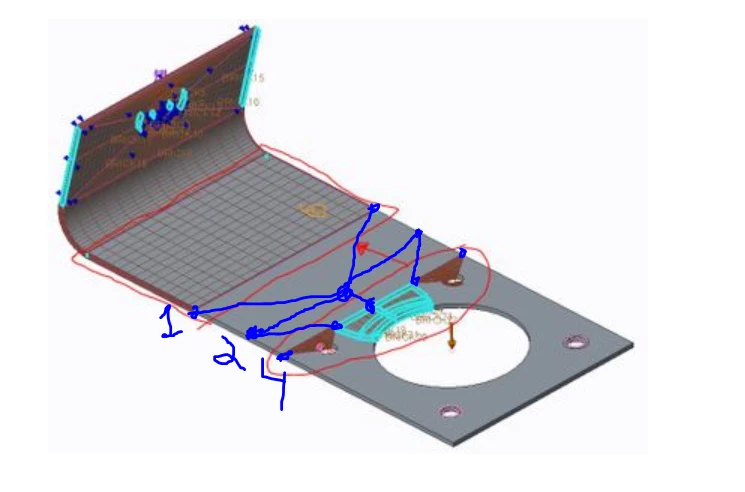
As I have some holes in the surface (see very bottom), I am having to do some jiggery pokery to transition from the highlighted area to a nice, uniform, brick mesh but I have come across an issue that doesn't allow me to create certain volume regions such as this:


So I am wondering, am I missing some criteria that means I cannot create volumes in certain locations?

 mapped mesh.JPG 

Cheers,

Nick

Best answer by SweetPeasHub


The volume regions cannot have a single face on one side and multiple on the other.  There are 4 segments on one side and 1 on the other.  You have two choices.  1. Propagate 4 segments through entire model.  2. generate a transition from 4 to 1 segment.  This image shows option 1.


Mapped1.PNG


And this one shows option 2.  Option 2 requires some wedge elements to generate the transition whereas only bricks are needed for Option 1.

mapping5.PNG


On the other hand I prefer not to use volume regions but rather datum points to define the regions.

These images show how I use sketches and datum points to generate the mapped mesh.  It is a little more tedious because of picking 8 points instead of 2 faces as well as the initial generation of the points is more tedious.  I have had better success mapping this way.

Mapped2.PNG


Mapped3.PNG


Mapped4.PNG


There sill might be some further refinement needed as far as element sizes and smoother transitions.


regards,

2 replies

nhall12-AmethystAuthor
12-Amethyst
June 13, 2018

My first image is not appearing in the post, on my screen so here it is again....


17-Peridot
June 13, 2018


The volume regions cannot have a single face on one side and multiple on the other.  There are 4 segments on one side and 1 on the other.  You have two choices.  1. Propagate 4 segments through entire model.  2. generate a transition from 4 to 1 segment.  This image shows option 1.


Mapped1.PNG


And this one shows option 2.  Option 2 requires some wedge elements to generate the transition whereas only bricks are needed for Option 1.

mapping5.PNG


On the other hand I prefer not to use volume regions but rather datum points to define the regions.

These images show how I use sketches and datum points to generate the mapped mesh.  It is a little more tedious because of picking 8 points instead of 2 faces as well as the initial generation of the points is more tedious.  I have had better success mapping this way.

Mapped2.PNG


Mapped3.PNG


Mapped4.PNG


There sill might be some further refinement needed as far as element sizes and smoother transitions.


regards,

nhall12-AmethystAuthor
12-Amethyst
June 14, 2018

Can I just start by saying... Wow! That is a thing of beauty!


I had a go with the datum point method with some success but I think I'll start this again, as currently it looks a complete horror show in comparison!

Capture.JPG

Thank you for your help.


Nick