
15-Moonstone
August 16, 2022
Question

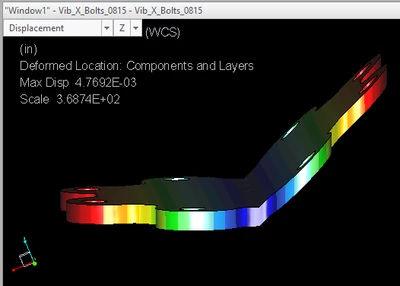
What is the cause for this glitch in Simulate?
  • August 16, 2022
  • 1 reply
  • 1813 views

JS_9824412_0-1660655761610.png

This is a flat disc inside a stack of hundreds of discs. Is this a prank by a hacker?

(BTW, company is buying Abaqus FEA, after having dropped CREO and started to use SWX. I am supporting Simulate, however, please make these non-stop glitches disappear.)

1 reply

12-Amethyst
September 21, 2022

I don't know anything about your constraints or loads but I'm wondering if it has something to do with the scale. Per your screenshot, you have a max displacement of 0.00477" and the scale is 369. This combination makes the displacement appear to be 1.76". You're probably plotting your results with the deformed scaling as a percent of model size. Look at the results without the deformed shape or uncheck the % box and enter a more reasonable scale. Another thought, I believe the actual deformed shape uses the displacement magnitude but the color plot is using displacements in the Z direction only in your case. That might be something to experiment with too.

15-Moonstone
September 26, 2022

Good idea, but this is a symmetrical part under a PSD load (vibration analysis). If we pay attention to the coordinate system triad shown in bottom left corner, the deformation is kind of symmetry. however is not symmetrical in local details.