12-Amethyst
June 13, 2024
Solved

Can't insert figgroup element

  • June 13, 2024
  • 1 reply
  • 2017 views

Hi,


I'm trying to insert the figgroup element as shown here:
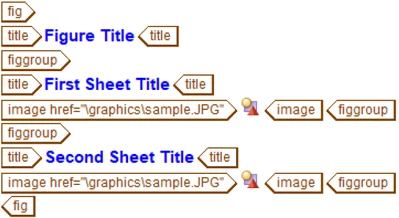
JSkog_2-1718275588951.png


However, it is unavailable as markup to insert:
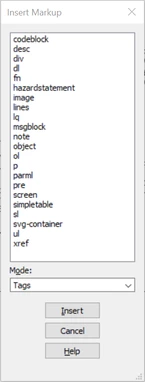
JSkog_1-1718275493607.png


I am able to locate it in the stylesheet:
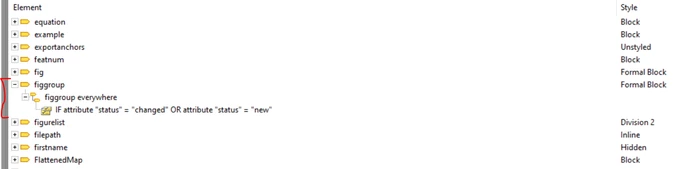
JSkog_0-1718275454428.png


Any help would be greatly appreciated.


Thanks,

Jeff

Best answer by bfriesen

My guess is yes you will need to reach out to the consultants for them to check what has changed that is not allowing the figgroup to not show up. If it is not throwing errors about the element, that means it is still valid in the context.


Bryon 

1 reply

18-Opal
June 13, 2024

If you search the online knowledge base, the last time anything figgroup was mentioned was in the servicemanual application documentation for editor 6.1 F000.


Hidden Elements and Attributes
The following elements are included in the DITA document types, but are not
intended to be used for authoring. By default, these elements are not displayed in
the PTC Arbortext Editor Insert Markup and Quick Tags features.
• boolean
• data
The data element is not hidden when the cursor is in the topicmeta
element in a DITA map, the prolog element in a DITA topic, or in a
specialization based on either of those elements.
• data-about
• figgroup
• foreign
• index-base
• indextermref
• itemgroup
• required-cleanup
• topicset
• topicsetref
• unknown


Bryon  

JSkog12-AmethystAuthor
12-Amethyst
June 13, 2024

Hi Bryon,


Regarding this excerpt from our stylesheet requirements (per our PTC consultant):

JSkog_0-1718289549752.png

Do we need to contact our consultant regarding the implementation of this specialization?


Thanks,

Jeff

bfriesen18-OpalAnswer
18-Opal
June 13, 2024

My guess is yes you will need to reach out to the consultants for them to check what has changed that is not allowing the figgroup to not show up. If it is not throwing errors about the element, that means it is still valid in the context.


Bryon