

13-Aquamarine
January 29, 2016
Solved

find carriage return in Arbortext Editor 6.1

  • January 29, 2016
  • 3 replies
  • 2131 views

Hi,

our users often copy and paste text from a pdf file into a xml file in Arbortext Editor 6.1.

If they do this, they get the carriage return into xml, which is displayed like an arrow:
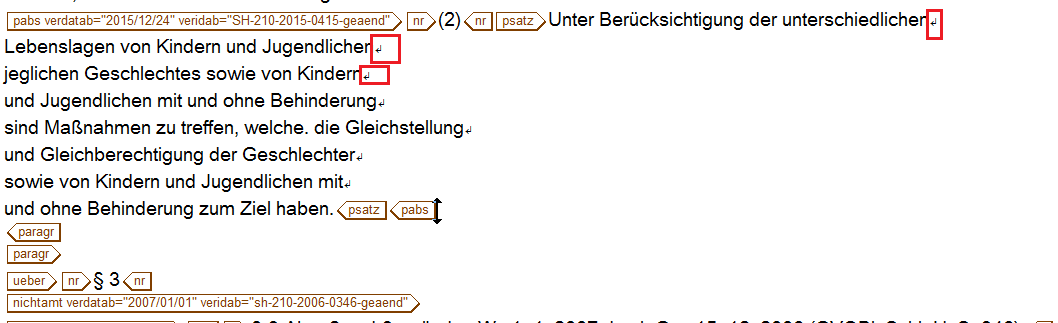
crlf.png

Now we would like to search this carriage returns, which has the entity-code: 


Unfortunately we cannot search this returns. This is also not possible with the "find" command. The only way to find them, is the method with "find selection". But we also would like to replace them.

Anybody an idea?

Thank you in advance for your help.

Best answer by bfriesen

Not sure if this will help, but we have had issues with not recognized fonts when copy and pasting this is how we were told to find it

In the error window it will tell you in brackets the number of the offending font (129,0x0081).

You will use the first number to search for the bad font. This window will also tell you where to locate the bad font. If it

says something about filename.style you need to look in the style sheet. If not it should tell you show you a path to the bad file.

How this procedure works is that you give the character an atribute of "findit", then you search on that attribute. If you do not do this then you will not be able to search for the bad font as there is nothing to search on.

Open the document or fosi in Arbortext Editor. At the Arbortext Editor Command: line enter $FINDIT=chr(129) and hit the Enter key Now enter (find "$FINDIT") you may not need the quotes.

Bryon

3 replies

bfriesen18-OpalAnswer
18-Opal
January 29, 2016

Not sure if this will help, but we have had issues with not recognized fonts when copy and pasting this is how we were told to find it

In the error window it will tell you in brackets the number of the offending font (129,0x0081).

You will use the first number to search for the bad font. This window will also tell you where to locate the bad font. If it

says something about filename.style you need to look in the style sheet. If not it should tell you show you a path to the bad file.

How this procedure works is that you give the character an atribute of "findit", then you search on that attribute. If you do not do this then you will not be able to search for the bad font as there is nothing to search on.

Open the document or fosi in Arbortext Editor. At the Arbortext Editor Command: line enter $FINDIT=chr(129) and hit the Enter key Now enter (find "$FINDIT") you may not need the quotes.

Bryon

12-Amethyst
February 2, 2016

Bryon's idea is good. I tested from the Arbortext Editor's command line

$FINDME=chr(13); find "$FINDME"

and it works well in my test case.

<book lang="en">

<chapter>

<title></title>

<para><programlisting>test

see me

search for CR</programlisting></para>

</chapter>

</book>

hbestler13-AquamarineAuthor
13-Aquamarine
February 4, 2016

Hi Bryon,

Hi Tim,

Bryon's idea is perfect! We used this command in ACL and built our own find-dialog to fix this carriage returns, so that our customer can decide for himself if he deletes or replaces this carriage-return. Now it looks like:

pfeilsuche.png

Thank you for your help. Very helpful support here!

Many greetings from germany.