4-Participant
May 29, 2024
Solved

Integration of Codebeamer with Windchill PDMlink via OSLC and ThingWorx flow

  • May 29, 2024
  • 2 replies
  • 1688 views

 We have integrated Codebeamer with Windchill PDMLink via OSLC and ThingWorx Flow. We created a custom field ,called[ Windchill ] to add the Windchill Link to the properties of codebeamer project trackers. Every time we need to add the URL of Windchill manually.
Our query is how can we populate the field automatically with Windchill Link. Are there any steps we could follow? or we can add it manually only. 
Best answer by alfonso_c

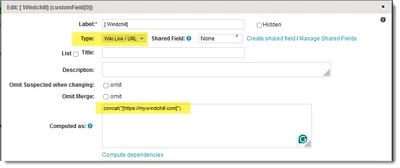
Hi @VM_10824513 , if you want a Codebeamer tracker field always to have a certain link by default, you can create a new custom field of Wiki Link / URL type at tracker configuration > Fields tab and add a computation formula like for example concat("[https://mywindchill.com]")

alfonso_c_0-1717004542305.png

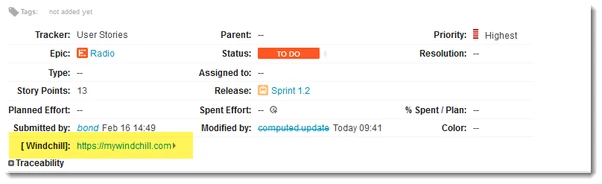
Now, all items in that tracker will show a field with that hyperlink:

alfonso_c_1-1716968736069.png


Please note that I am no expert on Windchill integration and I am not sure if this action will harmonize well or conflict with the official integration guides. For more information, please consult Codebeamer DPT Integration.

2 replies

alfonso_c14-AlexandriteAnswer
14-Alexandrite
May 29, 2024

Hi @VM_10824513 , if you want a Codebeamer tracker field always to have a certain link by default, you can create a new custom field of Wiki Link / URL type at tracker configuration > Fields tab and add a computation formula like for example concat("[https://mywindchill.com]")

alfonso_c_0-1717004542305.png

Now, all items in that tracker will show a field with that hyperlink:

alfonso_c_1-1716968736069.png


Please note that I am no expert on Windchill integration and I am not sure if this action will harmonize well or conflict with the official integration guides. For more information, please consult Codebeamer DPT Integration.

Community Moderator
June 5, 2024

Hello @VM_10824513


It looks like you have a response on your topic. If it helped you solve your question please mark the reply as the Accepted Solution. 

Of course, if you have more to share on your issue, please let the Community know so other community members can continue to help you.

Thanks,
Community Moderation Team.