
1-Visitor
February 25, 2025
Solved

Issue creating working set using requirement trackers

  • February 25, 2025
  • 1 reply
  • 996 views

I have a number of trackers of Requirement type which have data in them, it seems that if I try to create a working set all the Requirement trackers with data in them are unable to be unshared.


The file Branchable.json.txt contains the tracker definition for the tracker which I can branch which is also empty. However, Not_Branchable.json.txt includes a lot of data which I need to branch, but which in fact will not let me branch it.


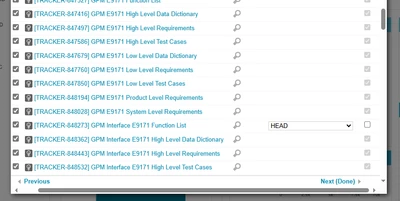
As you can see from this screenshot, the shared checkbox is grayed out and will not let me change it. So, the question is, what have I done wrong in order to use Working Sets?
DH_12953431_0-1740505679989.png

Best answer by tymorrow

Hello,


This is a limitation of Working Sets. Please refer to the Wiki.


  • Non-brancheable trackers can be only added as shared trackers.
  • Brancheable trackers can be added as shared and included too.

However, "Requirement" type trackers are not considered non-brancheable by default:

  • Non-brancheable trackers: these trackers cannot be included in a Working-Set, only shared or excluded. Non-brancheable trackers are test run, release, team, platform, test configuration, work log, issue, contact, bug, and document.

  • If a tracker has remote synchronization (for example via Doors Bridge), it can be part of a working set only as a shared tracker'
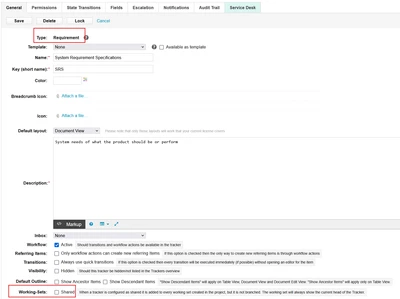
  • You should check the configuration for these trackers, and ensure they are "Requirements" type trackers and that the "Shared" checkbox is unchecked.

tymorrow_0-1740508765236.png


1 reply

tymorrow12-AmethystAnswer
12-Amethyst
February 25, 2025

Hello,


This is a limitation of Working Sets. Please refer to the Wiki.


  • Non-brancheable trackers can be only added as shared trackers.
  • Brancheable trackers can be added as shared and included too.

However, "Requirement" type trackers are not considered non-brancheable by default:

  • Non-brancheable trackers: these trackers cannot be included in a Working-Set, only shared or excluded. Non-brancheable trackers are test run, release, team, platform, test configuration, work log, issue, contact, bug, and document.

  • If a tracker has remote synchronization (for example via Doors Bridge), it can be part of a working set only as a shared tracker'
  • You should check the configuration for these trackers, and ensure they are "Requirements" type trackers and that the "Shared" checkbox is unchecked.

tymorrow_0-1740508765236.png


1-Visitor
February 25, 2025

Can I suggest as a fix for this that you add to the linked Wiki page something about the external synchronization limitation, because that is not listed on that Wiki page.