
10-Marble
December 17, 2016
Question

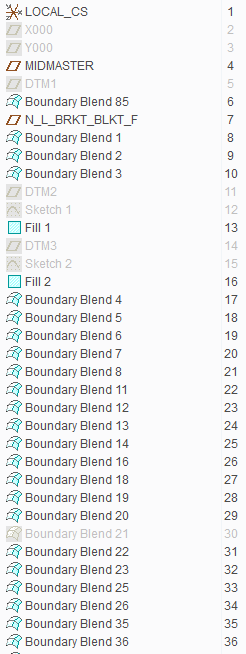
Boundary blends dependent on boundary blends? Can I lock some in place and make them independent?

  • December 17, 2016
  • 1 reply
  • 2598 views

This weekend I was tasked with modifying a piece made almost entirely of boundary blends. Typically this wouldn't be an issue and an easy fix but this time the BB's are dependent on other BB's. My model tree is almost entirely BB's. I don't have a lot of experience with these as I'm usually designing with solids. The biggest problem here is that the surfaces that need changing are smack dab in the middle of the model tree. They are not grouped together either, for example Boundary Blend 8, 9, 13, 15, and 27 need to be changed. Is it possible to lock these BB's in place or somehow reference them to other geometry without the entire model failing?
bbs.PNG

    1 reply

    StevetS10-MarbleAuthor
    10-Marble
    December 17, 2016

    I've given up and started modeling a new piece with less dependent boundary blends.. I just tried for 4 hours to work on that and every single thing I tried resulted in more than half the model failing due to association issues.

    1-Visitor
    December 18, 2016

    Sometimes models end up precarious.

    It reminds me that one tool that is not available to Creo modelers is something used in other software development environments, fuzzing. This puts alternate values into the model to see if it is robust against changes. Alterations to dimension and other parameter values and to accuracy would discover areas that are more sensitive than expected.

    I've had models that, were they buildings, could be brought down by a snowflake landing on a windowsill.

    StevetS10-MarbleAuthor
    10-Marble
    December 19, 2016

    That's exactly what I felt like with this one. My boss reassured me that modifying it should be no problem. After exhausting every thing I could possibly think with Creo I had to take the route of recreating the whole thing with the modifications I needed. I'm not sure it's actually possible to modify something where several changes needed to be made.. Modifying a sketch on a plane that already exists in the model is one thing, but this was modifying actual large chunks of the model.