1-Visitor
June 29, 2015
Solved

Creo to Solidworks

  • June 29, 2015
  • 2 replies
  • 5581 views

Do anyone know, in what format we need to save the creo template to open it in Solidworks???

    Best answer by Mahesh_Sharma

    Prabhu,

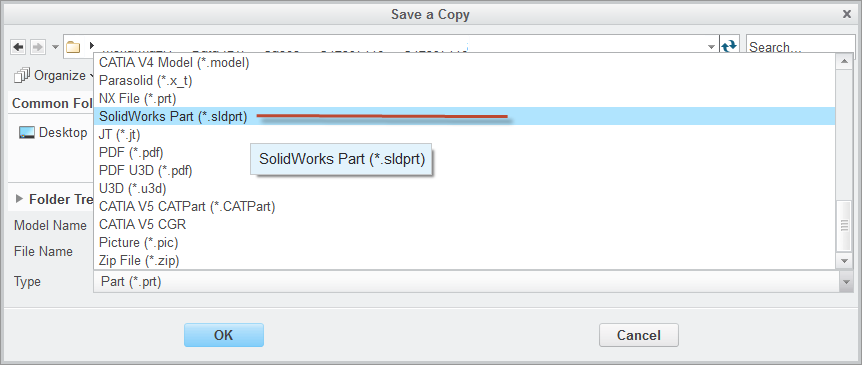
    If you are working with Creo 3.0 and have license Collaboration_Ext_SolidWorks, you can Save the data as Solidworks data (.sldprt or .sldasm)

    Check article at https://support.ptc.com/appserver/cs/view/solution.jsp?n=CS184567

    For earlier versions you may try using global translates .iges or .step

    Solidworks.png

    2 replies

    22-Sapphire I
    June 30, 2015

    Prabhu,

    If you are working with Creo 3.0 and have license Collaboration_Ext_SolidWorks, you can Save the data as Solidworks data (.sldprt or .sldasm)

    Check article at https://support.ptc.com/appserver/cs/view/solution.jsp?n=CS184567

    For earlier versions you may try using global translates .iges or .step

    Solidworks.png

    22-Sapphire I
    July 1, 2015

    Prabhu,

    Does the information in last reply answer your question?

    1-Visitor
    December 25, 2016

    Good day!

    I am working with Creo 3.0 and have license Collaboration_Ext_SolidWorks.

    When I save my Assembly unit in CreO as Solidworks.sldasm, open this file in Solid Works, so I get unit without any solid geometry, but only basic planes, like in this picture. Please, help me, how can I translate my unite from Creo to Solid Works? Thanks in advance.


    SW.jpg

    23-Emerald III
    December 27, 2016

    Hi Olimpiya,

    You should repost this as it's own question instead of a reply to an existing post. You will likely get much better help.