
1-Visitor
August 1, 2016
Question

Need Help with Spline Control

  • August 1, 2016
  • 2 replies
  • 6443 views

Is there a way to make a 2D spline tangent to some other entity, like a line or plane, at a point that is in the middle of the spline, rather than just an endpoint?  The attached picture shows an example of what I am trying to accomplish (easily achievable in SolidWorks).  I can make a line tangent to a spline referenced in a different sketch, but I can't make it work with a line and a spline that are in the same 2D sketch, nor can I make a 2D spline tangent to a line that is referenced from a different sketch.  The only workaround I've found is to use two splines, but that introduces some undesirable changes in curvature continuity that wouldn't be present if it were just one spline. 
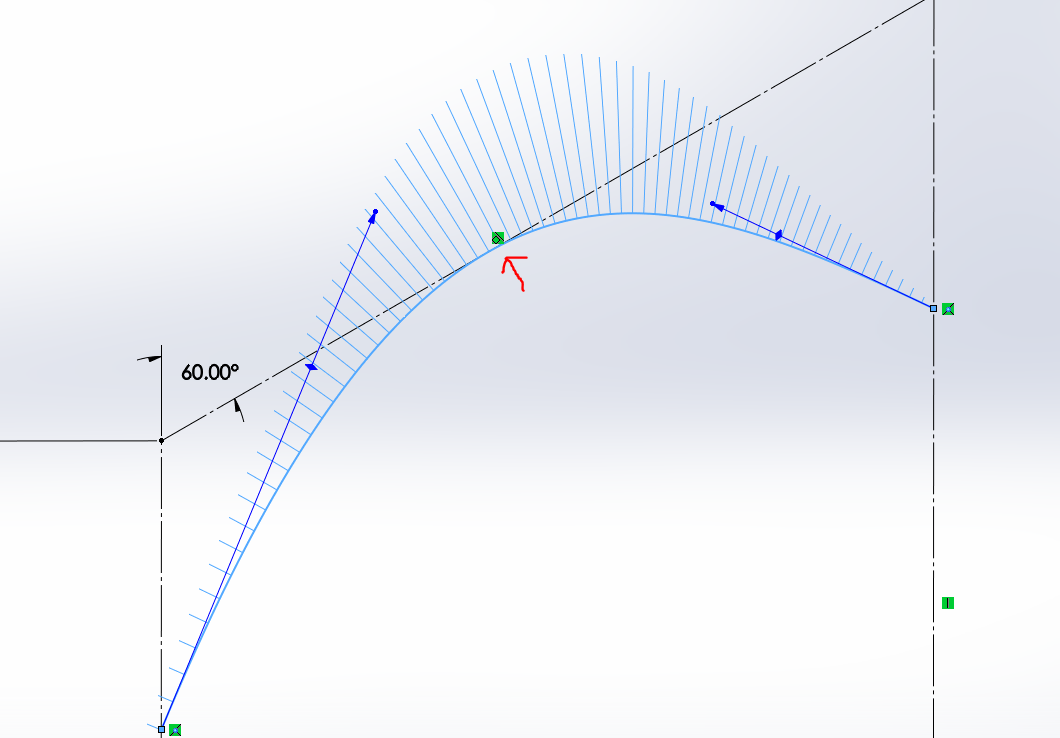
spline tangency.PNG

Note how the spline is tangent to the line in the middle where the red arrow is, and the curvature combs are nice and smooth.  It seems like there has to be a way to do this in Creo as well and I must be missing something; any help would be appreciated.

    2 replies

    1-Visitor
    August 1, 2016

    Sketch your spline with a point on the tangent line. Create an angle dimension by first selecting the spline, then select the point, then select the line. Change the value to 180

    dw-21-VisitorAuthor
    1-Visitor
    August 2, 2016

    Thanks!  Although I now have to ask, is there another method that doesn't require adding in that additional spline point?  Or can it be done while using the control polygon to manipulate the spline rather than interpolation points?

    17-Peridot
    August 2, 2016

    I posted this idea as it would solve part of the issue.

    please vote on it if you can.

    Improve sketched spline manipulation

    For those not able to access the Ideas section:

    PTC Creo 3.0: Sketched Spline Manipulation - YouTube

    17-Peridot
    August 2, 2016

    I keep running into spline limitations in Creo.  This is an algorithm that's been around for ages and has never been optimized to more recent standard ways of manipulating them.  This is one area that needs some enhancement!

    Had a similar issue when I tried offsetting a spline inside a sketch

    17-Peridot
    August 2, 2016

    Okay, yes, you can make the 2-point spline and fit the references around it using tangency.

    When you go back and edit the spline, the references move.

    dw-21-VisitorAuthor
    1-Visitor
    August 4, 2016

    Yes, I am able to do that.  The problem is that I was trying to (partially) drive the spline from the other references, not the other way around.