15-Moonstone
June 10, 2016
Question

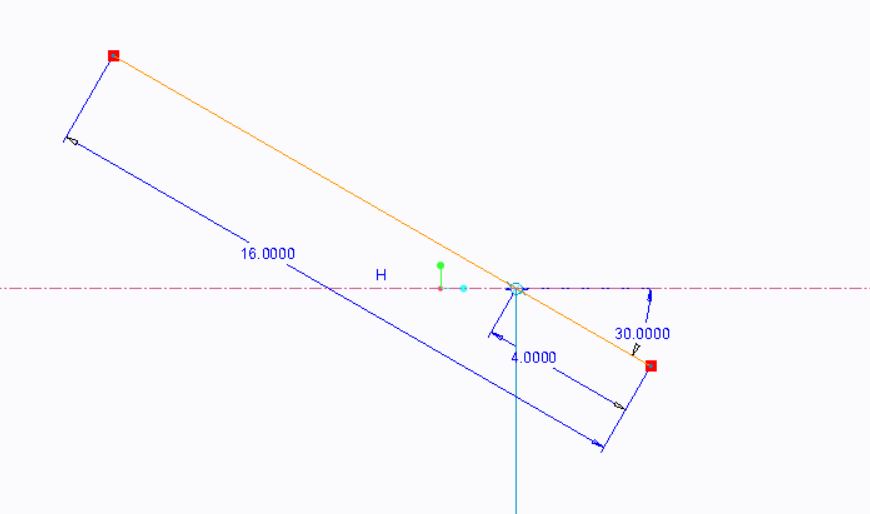
not able to give zero angle in sketcher to the line?
  • June 10, 2016
  • 4 replies
  • 3081 views

zero_angle.JPG

not able to give zero angle in sketcher to the line?

    4 replies

    1-Visitor
    June 10, 2016

    That is true. I'd bet it's because the solver can't tell when the angle changes which way is positive.

    If a zero angle is required, I create a datum on the fly that has an angle and align geometry to that. It is tricky to make sure that a horizontal line doesn't get excess constraints. Watch for parallel/coincident-horizontal constraints being added by Intent Manager.

    15-Moonstone
    June 10, 2016

    Thanks,that was very helpful.

    24-Ruby III
    June 10, 2016

    Hi,

    in CR2 M070 I can set zero angle in Part mode. When I edit feature definition later, then Sketcher accepts zero value, too.

    MH

    15-Moonstone
    June 10, 2016

    mine is student edition creo 2.0 m120.

    1-Visitor
    June 10, 2016

    you can give angle in another way

    Change to 90 deg..

    1-Visitor
    June 10, 2016

    Once you have completed your sketch try Edit instead of Edit Definition. For me trying to change the value in sketcher wouldn't change it but it would using Edit.

    1-Visitor
    June 11, 2016

    There are a number of other conditions where what a feature requires is at odds with what Intent Manager can deal with. I sometimes wish for a mode that allows Sketcher to access different dimensions than the feature has to prevent Intent manager from re-evaluating the solution it had that worked and replacing it with one that fails. It used to be more of a problem when slightly angled lines would be promoted to horizontal or vertical and required the sketch to be far from H or V and altered at the feature level.