
1-Visitor
June 23, 2014
Question

Spring - Wrap Command

  • June 23, 2014
  • 1 reply
  • 1838 views

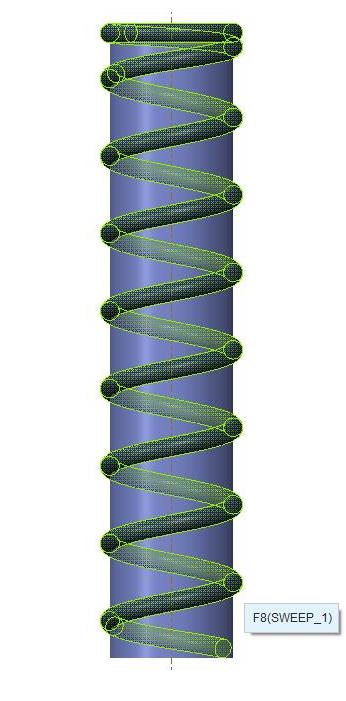
How do I get the other end to wrap like the top end. I need the bottom to lay flat like the top but I need it the be tangent to the extruded cylinder. spring.jpg
    1 reply

    17-Peridot
    June 23, 2014

    Are you using this method?

    Closed and Ground Spring - Alternative to Helical Sweep

    For a high level of control, I prefer this wrapped method to manage the entire spring.

    You patch together different feature for a simpler version such as adding revolves at both ends.

    You can also manage varying pitch along the helical sweep but a true flat bottom will not be achieved.

    Also remember that a sweep orientation can be normal to a selected feature such as a vertical plane. The section profile of the wire will not be perfectly round, but it is easier to merge with other features.

    1-Visitor
    June 23, 2014

    Yes, this is the same one I used, just w/out the ends cut off. Where would I find normal to a selected feature?

    17-Peridot
    June 23, 2014

    You can create the bottom the same as the top to get it flat. Just have a horizontal section in the sketch with a radius (fillet) where the slope begins.

    This is the option to change the orientation of the swept sketch:

    normal2projection.PNG

    This is not normally recommended for sweeping round features but the option is there and should be noted as to the difference. Normally, I could connect a datum curve to the sweep trajectory to make a clean tangent if I needed to do this with a separate feature. It is a bit of work, but the datum curve is good about joining 3D curves where and when needed.

    Remember to use a coordinate system in the sketch to assure proper wrapping of the sketch.
