
1-Visitor
January 16, 2017
Question

Thickening surfaces problem

  • January 16, 2017
  • 4 replies
  • 4516 views

Hi all,

I've just finished building the main surfaces for the mouse I'm building but I'm having issues thickening the bottom and middle parts into solids. If anyone has any idea what the problem is I'd appreciate the help. See attached.

The model is created in the student edition of 3.0 unfortunately which I realise can't be opened in the real version.
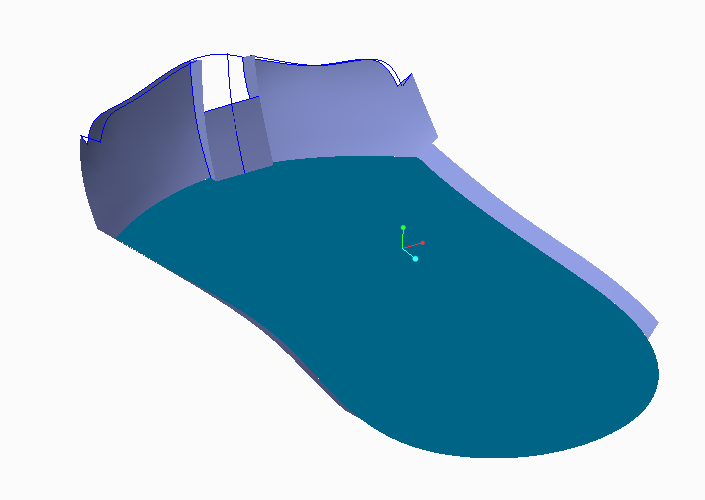
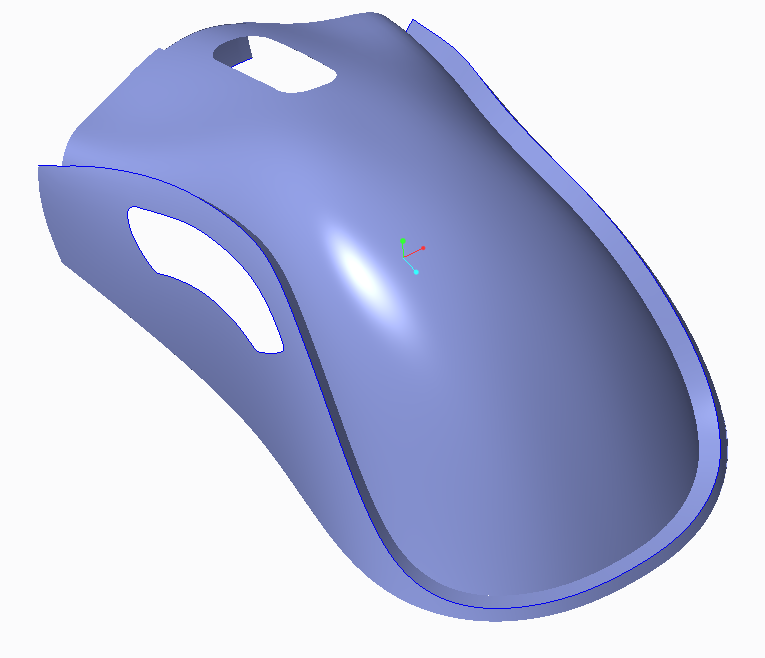
bottom.PNGmiddle.PNG

    4 replies

    1-Visitor
    January 17, 2017

    I found maybe a bug.

    When I created surface from datum plane that not the front plane , I could not do thicknen. Suppose I want to thicken the surface 6 mm , the error show that the minimum thickness should be 6.01.

    However when I do the same surface from front plane I can do thicken 6mm.

    I dont know the root cause...

    Thank

    17-Peridot
    January 17, 2017

    Thickening is dependent on the smallest feature that must remain.  Often, rounds are added too early.

    Features that disappear within the thickness specified cause the problem.  Consider adding these manually, or use the thicken optional thicknesses.

    You could always build your inside skin using offset surfaces from the outside skin.  Merge them and once you have an enclosed solid in a single quilt, you can solidify it.  A few other tricks, but thicken is not a very powerful command.  It demands a lot from the user.

    1-Visitor
    January 24, 2017

    If you have any sharp corners or radii that are too small, the thicken will fail. This is likely like the problem. Otherwise, you could try adjusting the accuracy of the part--which may also be the problem.

    1-Visitor
    January 24, 2017

    when I have trouble with complex geometry I have 2 strategies I employ to track down the problem.

    1) I'll go back in the model tree and try thickening earlier IF that makes sense.

    2) I'll use a simple protruded rectangular cut to cut-away sections of the model just before the thicken feature.  Then you can move the cut-out around and change it's size until you locate the problem region.

    There are a lot of reasons why thickening will fail.  some mentioned already and some not.  using the above method you can pinpoint the culprit and then either make a cut-out and thicken without the problem area, or find a way to fix the problem area.

    As well, some geometry is more robust than others... over time you will get a feel for which are most likely offending things so you can more quickly spot them.