1-Visitor
October 29, 2010
Solved

wire rope i proe4.0

  • October 29, 2010
  • 3 replies
  • 7233 views

how to make wire rope in proe 4.0? plz explain me i am getting problem. i have tried all ways.

    Best answer by DavidButz

    Rajesh,

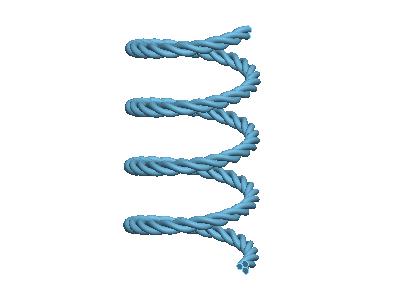
    This is usually done with the use of the Variable Section Sweep. A VSS allows you to create the circular cross-section of an individual cable strand and cause it to twist around an arbitrary curve trajectory at the centerline of the cable using Sketcher Relations to force the twisting. For example:

    3-wire_spring_3.jpg

    In the illustration the cable itself is hellical, but it could be a shape representing its passage over pulleys, etc

    I can't seem to attach more than one picture to illustrate, so more in the next piece.

    David

    3 replies

    DavidButz1-VisitorAnswer
    1-Visitor
    October 29, 2010

    Rajesh,

    This is usually done with the use of the Variable Section Sweep. A VSS allows you to create the circular cross-section of an individual cable strand and cause it to twist around an arbitrary curve trajectory at the centerline of the cable using Sketcher Relations to force the twisting. For example:

    3-wire_spring_3.jpg

    In the illustration the cable itself is hellical, but it could be a shape representing its passage over pulleys, etc

    I can't seem to attach more than one picture to illustrate, so more in the next piece.

    David

    1-Visitor
    October 29, 2010

    Once you have defined a Curve representing the centerline of the cable, you choose that Curve as the trajectory for a Variable Section Sweep. For the section you then sketch something like the following:

    Sketch_1.jpg

    The Sketcher Relation governs the angular location of the circular section relative to the trajectory. [sd8=60+(trajpar*10800)]

    "trajpar" is a parametric control parameter that varies continuously along the trajectory from a value of 0.0 to 1.0.

    Multiplying trajpar by 10800 insures 30 full twists of the section. The addition of 60 gives an easy handle for getting all three wires.

    If you copy the feature twice and change 60 to 180 for one copy and 300 for the second you will have three strands which are spaced by 120 degrees from each other.

    1-Visitor
    November 23, 2010

    but what is sd8

    angle/ distance

    could me give one more clearer pick plz!

    thus i could understand better.

    1-Visitor
    November 24, 2010

    sd8 is the angle in the Sketch. This is a Sketcher Relation, not an ordinary Part Relation; in other words, you create it while you are in the Sketch.

    1-Visitor
    October 29, 2010

    You can even "go crazy" with something like this:

    3-wire-3-cable.jpg