
18-Opal
November 6, 2019
Solved

Ask to share ideas to collect holes

  • November 6, 2019
  • 2 replies
  • 2636 views

Hello,


I am configuring an algorithm to collect holes from a solid model.
If ProSurfacedataGet returns 2, it is determined to be a hole.
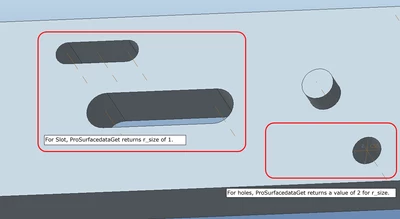
Q56.png
In the case of the slot, there is no sense of how to deal with it.

The argument we use to identify the hole is a solid model, surface.


Can anyone share a good idea to identify the hole in the case of a slot?


Thanks.


Warm Regards,

SeonHo Cha

Best answer by sully7

One method we've used in the past (its a bit cumbersome, but it works) is to use:

  • ProSolidSurfaceVisit - to loop through the surfaces on the PRT, followed by
  • ProSurfaceContourVisit - to loop through the contours on the surface, followed by
  • ProContourEdgeVisit - to find all edges in the contour

If you loop through all of these items, you can use the appropriate data methods (such as ProContourdataGet and ProEdgeDataGet) to help determine what kind of edges you have. From there, its pretty easy to determine what a "slot" is by comparing # of edges in the contour, + the types, lengths, and radii of the edges.


One nice thing about this method too, as opposed to using ProHole methods (etc), is that it usually works pretty well on imported or non-native geometry as well. 


Hope this helps!


James Sullivan

2 replies

sully714-AlexandriteAnswer
14-Alexandrite
November 6, 2019

One method we've used in the past (its a bit cumbersome, but it works) is to use:

  • ProSolidSurfaceVisit - to loop through the surfaces on the PRT, followed by
  • ProSurfaceContourVisit - to loop through the contours on the surface, followed by
  • ProContourEdgeVisit - to find all edges in the contour

If you loop through all of these items, you can use the appropriate data methods (such as ProContourdataGet and ProEdgeDataGet) to help determine what kind of edges you have. From there, its pretty easy to determine what a "slot" is by comparing # of edges in the contour, + the types, lengths, and radii of the edges.


One nice thing about this method too, as opposed to using ProHole methods (etc), is that it usually works pretty well on imported or non-native geometry as well. 


Hope this helps!


James Sullivan

CHASEONHO18-OpalAuthor
18-Opal
November 7, 2019

@sully7 ,Thanks a lot.

I'll test and apply it.//

RPN
18-Opal
November 17, 2019

You may give this a try as well:


ProSurfaceSameSrfsFind (ProSolid solid,
ProSurface surface,
ProSurface **r_surf_arr,
int *r_size);

Purpose: Finds and returns an array of surfaces that are the same as the
input surface. For example, in the case of a cylinder, Creo Parametric
creates two half-cylindrical surfaces. If you input one half, the
other half is returned by this function.