
1-Visitor
November 5, 2021
Question

Browser display size inside Creo window

  • November 5, 2021
  • 2 replies
  • 3092 views

We went from 4.0 to 7.0.  Now the imbedded browser window graphics is too large for the window it is in.  I changed the % size of the main window display in Options but this had no affect on the relative size of the graphics within the window. I have tried other Options settings and not found anything to help.  It is the same regardless of the monitor size and/or display resolution as well. 

Checkout the pic below.  This is nearly useless!
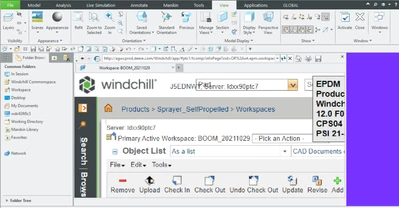
AD_8983019_0-1636126154408.png


2 replies

23-Emerald IV
November 5, 2021

1.)  Which embedded browser are you using?  You can check by looking at the windows_browser_type config option inside Creo.

TomU_0-1636127291101.png


2.)  What is your screen resolution?

24-Ruby III
November 5, 2021

A similar issue - "Creo Parametric 4.0 embedded chromium_browser display issue with Windows 10 scale larger than 100%": https://community.ptc.com/t5/System-Administration/Creo-Parametric-4-0-embedded-chromium-browser-display-issue-with/td-p/493194

23-Emerald IV
November 5, 2021

There are some known default zoom issues with the Chrome embedded browser in certain builds of Creo.  That why I wanted to know what browser first...