
18-Opal
August 6, 2026
Question

CREOSON AI MCP Interface (tested - what is next?)

  • August 6, 2026
  • 18 replies
  • 367 views

A preview of something that is being tested within CREOSON, looking for feedback and ideas.

Keep these questions in mind as you read:

  • Do I (or my company) care about my data going to someone else’s AI / Cloud?
  • What use cases, processes, interfaces cause pain today?
  • How could this change my day?
  • Why do I care?

The intent is to provide a FREE AI MCP (Model Context Protocol) interface within CREOSON that enables your AI Agents to connect to and drive Creo Parametric either as a specific set of contextual tasks - or within the context of other systems/environment workflows (e.g. YOUR models, standards, documents, EPR, PLM, etc.).  Seems like this would be super powerful, and provide a lot of utility.


This screen capture is an example of an AI Agent validating a connection to a new CREOSON MCP Endpoint (prototype currently). 
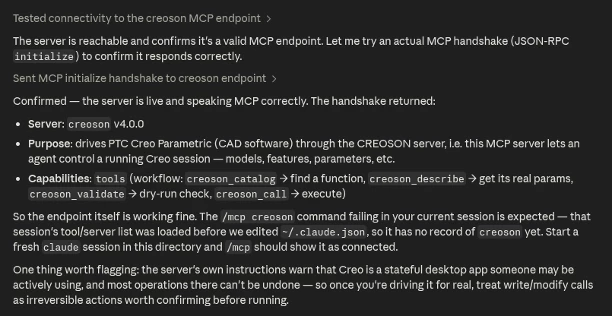
CREOSON - AI MCP Endpoint First Connection Test Result

The CREOSON MCP Server enables you to choose/bring your own AI (Commercial Platform or Local AI).  The screenshot above was tested using an Anthropic’s Claude Code (linux desktop) talking to a CREOSON / Creo Parametric Session across the network on a Windows 11 Machine. 😎


Talking to Big-Iron AI (Claude-Code, Codex, Gemini, Grok, etc) is for sure useful, but every interaction is training those models with your data.


I think that Local AI will be a top priority very soon for companies - especially regarding designs, specifications, internal documentation that represents genuine Intellectual Property that should not go to Cloud AI Models.


Local AI is coming (technically - it is already available/here)… and enables 

  • No AI platform dependency (multiple/capable open source models available)
  • No extra licensing fees required (you pay for power, not tokens),
  • Sovereign - YOUR data, processes, and interactions remain YOURS and in YOUR control (perfect for air-gapped or highly-regulated environments),
  • Flexible/Trainable/Extendable - easily connect to your documents, systems, and build your own skills (secret sauce) for what and how you do what you do...

Bonus regarding Local AI - most CAD systems already have very capable graphics card for running CAD and AI locally (low barrier to implementation/access).


Properly done, this would enable your Creo Models / Drawings to be folded into the context of other processes and workflows (documents, standards, specs, other MCP services in/out of your organization).


Any feedback on this potential CREOSON MCP capability?  Suggestions? Thoughts?


Dave


18 replies

18-Opal
August 6, 2026

And the first end-to-end test… across environments on a local network.  more to do and think about - but the prototype MCP interface seems to work nicely.


18-Opal
August 7, 2026

Well - this is encouraging…


18-Opal
August 9, 2026

Pretty cool example of AI adapting the execution to support the user intent. 😎


18-Opal
August 10, 2026

More interesting multi-part/path update test…


Let’s be honest.. AI can “hallucinate” and that is NOT a good thing when you are talking to a CAD System like Creo. 


Ask the latest and most powerful AI platforms specific questions about Creo Parametric (say configuring it or performing specific operations)… and get ready to laugh.  If AI has not seen any real or meaningful example(s), it will hallucinate and provide you instructions to configure things that do not exist, use menus that do not exist, and interact with menu tree items… ahem, that do not exist.  WHY?! 


AI is a “pleaser”… BUT when it does not have ground truth or examples in it’s training it makes assumptions (often by parallel examples) and presents confident guidance in the response. The more narrow your request combined with limited information/training data for the AI, and the hallucinations skyrocket.   Now, connect these results to a real system executing real APIs… what could go wrong?!?


How do you fix this?  Enable the AI to understand what it does not.


Latest CRESON-Agent beta is bringing unknown skills to AI - specifically to enable better contextualization, planning, and executions with Creo APIs. This helps reduce AI hallucinations, it does not eliminate them.  That being said… here is a zero-shot (perfect execution) of a human request to the CREOSON-Agent / Claude Code to a remote Creo Session.


18-Opal
August 10, 2026

Pretty cool test of the CREOSON Agent… I wanted to add Pro/PROGRAM logic that did not exist so that a component existence could be toggled in the assembly configuration.


One prompt, CREOSON Agent Skills and a MCP server on a different machine connected to Creo… 2 min later… perfect. 😎


18-Opal
August 11, 2026

One more validation test.  This time more complex/advanced interaction required by the AI.


Objective, create a Pro/PROGRAM for an assembly that would use a component vs part placement and setup a variable that uses a parameter value to dynamically load and place a model not in the design. (no cheating) 🤔


Spent a bit of time writing a new AI skill to enable the CREOSON Agent to rationalize Pro/PROGRAM;  Ahem, to specifically to implement the “best practice” vs what the old Pro/PROGRAM manual(s) and training says should be done.


The result is shown here.. (perfect - zero-shot excution)

NOTE: There were some previous interactions to use variable part placements, decided to upgrade to a component placement - different animal - great test of the CRESON Agent to rationalize such a significant change as it has multiple changes needed.  The result was automatically tested by the AI (shocked face here - pleasant surprise); I am showing the Pro/PROGRAM structure in Nitro-PROGRAM - because that is way more useful than the current Creo Tree View.

18-Opal
August 12, 2026

Remember when I said “Local AI?” 🤔  For those who care about their data … “Local AI” will be a top priority.


Here is a screen capture of a (very old) laptop running moden Linux, Ollama, and Gemma 4B (Google Gemini) LOCALLY


This configuration is talking to a Windows 11 Machine over the LOCAL network that is running a Beta version of CREOSON with a MCP (Model Context Protocol) endpoint.


A basic connection test, a worst case configuration (by design), on a very slow 10-year old laptop with no first-class graphics driver support, with a very small Local AI model.   BUT the most important thing... it worked! 😎


So this a preview of things to come.  BUT most Workstation-class Computers that run Creo should have NO PROBLEM running a Local AI like this with respectable performance.  This framework enables you to keep your data and interactions … (ahem) yours.


Let me know if there is anything you would like to see/test regarding AI and Creo Parametric.  The limitation will always be “APIs” -- but a LOT of useful work can be done (CAD / Documents / other environment integrations).


Dave


14-Alexandrite
August 13, 2026

Love this, since at this point I am basically mostly using voice-to-text for programming, why not design like that. Quite a lot of potential, but given the complexity of creo I think it will be wiped from the earth by some AI friendly CAD and MCP wont prevent that.

18-Opal
August 13, 2026

HA, yes this would work with audio for sure… I would have shown that, but I can’t seem to figure out how to screenshot that interaction.  🤣
 

In the end … this ALL comes down to the APIs…. If you can’t access them, the AI can’t either.  This is why we are seeing so many impressive demos with Claude/OpenAI/etc. driving OnShape, SolidWorks, and others … APIs that are available, well thought out, more stable, complete, and “useful”.  If an API or SDK does not enable everything a user can do .. to also be done by an AI … it is not a real API (CRUD is a thing, that should be the standard requirement for any API, method, function, etc.). 
 

APIs are the next “walled garden” for commercial software - the stuff that enables real work to get done.  If you look across industries (at ERP for example) … SAP is literally “freaking out” about AI… they were/are late to the game and locking down their APIs so customers can’t get to their own data with AI (let that sink in).   Why?  Well SAP sees a revenue stream, and they are rushing to get “AI” on the PowerPoint Slides as quickly as possible (don’t do it yourself - never mind the fact that the EXACT SAME commercial and open source tools you also use 🙄)  SAP is also realizing that customers can build vs buy faster now… and for a simple application (data in, data transformation, storage, notifications, data out, etc) the math is working for “build” and mange - SAP should be worried … an expensive database, file store and a crappy UX is very replaceable by a customer.  More technical capabilities that are genuinely proprietary and hard to “build” are where long term value is found - but these are legos in the box for a company to make their own… reliable, well structured, clean and obvious interfaces, they are and provide utility (compostable to a customers needs, - tool not the destination)


The “value” of a system (in the near future) will be defined by customer demands and abilities to access, control, and manage individual capabilities and the internal/external systems they interface with.  This is going to be interesting to watch and be a part of.


18-Opal
August 19, 2026

Another pretty cool example of the CREOSON AI Agent (beta) to automate the creation of Drawings from a specified Part.


In this example, the input input was to create a drawing using only the model name as the input. 

CREOSON MCP Endpoint (again beta) provides an interface to AI (local or remote) - Claude Code in this example.  AI models have basic knowledge about Creo Parametric; not so much on “how” to make it do things.  So, we taught it to do things… the way we wanted them to be done (and you can too!)


To get AI to reason about user desires for less work and execute more consistently on the boring stuff (like creating drawings), CREOSON AI Agent Skills provide some best-practice, real-world, “how to” guidance for your AI.  So, the intent of this example was to not just “create a drawing” (borning)… instead, “create a decent drawing!” (with needed views, placements, dimensions shown, non-overlapping views/dimensions, etc.).  Is it perfect, no… there will always be some cleanup or adjustments - AI is not perfect (even with perfect guidance). 


Is there a faster way?  Sure, write a program! (CREOSON / CREOPYSON is good for this - simple, works)


So why would I use AI over writing a program?  Simple:

  • Programs are deterministic - they deliver consistent execution; known inputs, expected evaluation/logic, predicatale delivery (when failures occur, they are obvious, program fixes required to address the edge cases). 
  • AI is inherently probabilistic - they typically deliver inconsistent execution, unless they have sufficient training/context to provide less inconsistency (much of this depends on the model and capabilities to plan on the fly, rationalize success/failure, refine, and iterate until solution is found/not-found)

BOTH of these approaches execute waaayyy more cleanly when you have experience and judgment in the mix; the failure modes differ, not just the failure rates.


Programmers that also understand how to actually use/leverage the CAD system are better than most - the same goes for AI.  So how do you make AI more “useful”, “predictable”, and “reliable” in your tasking?  Basically, focus on providing better context to shift the distribution of outcomes from random to more correct - hint: this is what AI Agent Skills are for!


NOTE: AI Agent Skills are the KEY to making AI work for you.  They are simple to create, understand, and reuse across multiple AI systems (basically Skills are portable and transparent knowledge / know-how).  AI Agent Skills are basically the new Intellectual Property (IP) - ahem… YOUR IP!  If you are going to begin working with AI, consider where your data and transactions are going - especially your Skills (they are the ultimate shortcut for third-party AI training on your specific know-how and use cases).  To counter the risks, make Local AI a top priority.  Local AI enables your knowledge, data, skills, and ALL the transactions within/around those to remain… yours.


Dave

10-Marble
August 21, 2026

HI Dave

I’ve created a simple AI agent using CREO JS. The problem I find was context of the API, which I think makes your MCP a very logic solution for CREOSON.

However, the API is still very limited, even in your examples here you need to know information like what dimension d0 is. Even if one setup the model so that d0 gets a more descriptive name means that you manually have to add this “context” for each model each time you have a new model. Which means that most of the time, using the existing CREO interface without AI is the logical most efficient step.

Another limitation I found was that the API for the things I really want to control is not exposed, and I think that even if it was, getting the AI to draw a complex sketch correctly is very unlikely. Which means there are really two layers missing in the CAD model.

  1. There are not enough API exposed to really make a difference
  2. Even if there was, the lack of understanding manufacturing processes and how the design of the model will get around those are not documented information, which an AI can learn from.

The latter problem is really where using AI ends up being a more frustrating experience than I would expect.

You have been very verbal online about the exposure of the API - we are having conversations where we discuss this in the boardroom. In CREO, we just don’t have enough control without spending truck loads of money, and even then we need to spend a large amount of time doing it in a way that suites out specific needs. This is really risky, because we don’t know the limitations till we pay and start.

On the positive side:
Would it be possible add context about your own internal creo setups, we have a huge amount of automated processes, Over + 1800 mapkeys, hundreds of automated python scripts integrations and several template setup for process optimizations. If we can combine this knowledge with your MCP then we will end up having outcomes that could potentially benefit having an AI agent.

We have a high mix low volume manufacturing environment, which means a lot of different parts mostly used once if we lucky twice. This means the standard of modeling is neglected for speed. In some cases this bits us hard, resulting in models with large circular references. In bad situations models that move off their intended coordinate (yes, it gets messy). These models costs us lots of time. It would be really nice to have an AI model be able to fix the circular references problem on models like this, or at least give suggestions of how to resolve them. My gut is that this type of problem is a simple closed loop problem which the AI model will resolve a lot faster than a human.

My feedback.
1. The outcome of CAD is so wide open that I think AI models are going to have trouble knowing when it is successful.
2. The lack of API exposure is a problem in CREO
3. The lack of context about manufacturing processes and how they should be applied is also a problem.
4. Internal integrations with existing mapkeys and automated processes
5. We are happy to trust a paid AI setup where their terms and conditions guarantee privacy of our data.
6. Model fixing circular references automatically or guiding the engineer to fix it.

Martin


18-Opal
August 22, 2026

Martin,

Thank you for the very thoughtful and detailed reply.


I’ve created a simple AI agent using CREO JS. The problem I find was context of the API, which I think makes your MCP a very logic solution for CREOSON.
 

Cool!  Yes - Context of the API is the pain point with AI. I was playing around with a few Local AI models today, was amazed by one model's inconsistency on the interpretation of my words relative to the APIs in CREOSON.


I told it to "open the speaker", and it persisted in trying to use the "interface" call because that was "logical" to it... The right answer was to use "file:open" command.. I told it that... BUT the model insisted "interface" was the right command and kept beating it's head on the wall (kind of like Ex-Machina prototypes trying to get out of the room).


Other models correctly interpreted my request as "file:open" should be used.. and executed dutifully ... so that was super cool! (100% Local AI talking to a Local Creo Parametric Session - which it also started remotely.. bonus points!)


However, the API is still very limited, even in your examples here you need to know information like what dimension d0 is. Even if one setup the model so that d0 gets a more descriptive name means that you manually have to add this “context” for each model each time you have a new model. Which means that most of the time, using the existing CREO interface without AI is the logical most efficient step.


Agree, this is why I have always told customers - use logical parameter names as your entry point to a dimension value. Yes this sucks for the user when you want to just change a dimension directly and it is driven by a parameter in a relation. I kind of wish PTC would fix that so you could modify the parameter value when it is exclusive to a dimension to skip the interruption - logical, simple, would work fine, removes friction.


But a logically named parameter is default "context" for an AI to leverage.  If that is your standard practice, then you just need a system prompt or skill to provide that "context" so AI does not waste time/tokens trying to figure out your meaning and a path to execution.   Good modeling standards are your friend with AI, most companies don't have them to this level, and they will be on the struggle bus until they figure out how to close that gap.


Another limitation I found was that the API for the things I really want to control is not exposed, and I think that even if it was, getting the AI to draw a complex sketch correctly is very unlikely. Which means there are really two layers missing in the CAD model.
 

1000% AGREE on this!  This is where APIs on CAD systems are becoming the competitive advantage regarding AI.  If the AI can't access an API to implement user requests/intent, no progress will be made. THIS is a MAJOR issue.


You bring up some low-level stuff that I think AI could totally do.  However it needs to be taught to draw through example and guidance.  It is totally possible in my view (this stuff happens ALL the time in other applications - CAD should be no different) - but APIs are required to enable.


There are not enough API exposed to really make a difference  Even if there was, the lack of understanding manufacturing processes and how the design of the model will get around those are not documented information, which an AI can learn from. The latter problem is really where using AI ends up being a more frustrating experience than I would expect.
 

Ok - so there are the APIs on one side, and your objectives on the other.  In the middle of that is the "how".  


AI models, unless they have enough domain specific examples in their training or have been finely tuned on a specific problem, are not going to magically figure it out.  Your interactions (arguments) with Cloud AI is helping them get better on your use cases - ahem... for everyone. 


Basic contextual information about manufacturing processes is one thing for AI to provide information on, completely different animal to act on it.


If you look back at my Pro/PROGRAM examples, these are good for a couple of reasons.
1) They leverage what AI already knows about Creo and Pro/PROGRAM (very generic, usefully wrong)
2) I gave AI better context on "how" to do Pro/PROGRAM (ignore what PTC docs say, do it this way, here is why) 


I specifically documented my experience and expectations for what "good" looked like in a "skill" so that the context was front and center in the process vs waiting for the wrong answer time and time again. Will it be perfect every time, no - but I am going to interact less.


So I would look into "skills" and how they can be used to guide your AI on a more specific process objective/need.  They are just Markdown files (with some optional tools and artifacts that you can also include).  Note: not all AI Models and providers support Skills; it is an open standard, but model/provider selection is a factor in their use.


You have been very verbal online about the exposure of the API - we are having conversations where we discuss this in the boardroom. In CREO, we just don’t have enough control without spending truck loads of money, and even then we need to spend a large amount of time doing it in a way that suites out specific needs. This is really risky, because we don’t know the limitations till we pay and start.


You present a very honest perspective - grounded in reality.


Multiple business models and processes are under attack by AI right now, we are watching it in real time.  AI learned to code and orchestration of that code is (right or wrong) knocking at everyone's door.


Those attacks is NOT coming from the AI platforms and models (they are -currently- an enabler, not a replacement for a CAD system, but people are actively working on that). The "real" attack is coming from within established customers (in your board room) where the benefits seem obvious, but the costs, benefits, and risks are NOT clear.


The costs and risks will literally skyrocket if needed functionality is NOT a confirmed BEFORE committing down the path. You should be concerned!


Generally speaking, "just buying" an API for ANY platform (CAD/Business/Enterprise) does NOT guarantee success. The purchased API may literally "suck" (incomplete functions, one-directional calls that check a box but not fully, version-specific function limitations, etc.).  These details are never presented/covered in the PowerPoint - you find this out months after the purchase. Figure this is a $100k experiment (licenses + resources + time required to find out) - maybe less if you can really dedicate time and focus like a laser beam.  Best case, you change your world; worst case, you confirm your pain can't be solved.


This is why I (strongly) recommend companies spend time profiling/categorizing/documenting their current processes, pains, and potential paths to relief.  Most importantly, have no kidding raw discussions with people/companies who have actually done it (with success or failure over multiple versions). THEN actually "try" before you "buy" anything.


If we were having this discussion two (2) years ago this would be a grind (demos don't last long, time gets in the way, light progress teases better progress, and you may commit and find out later it will not work).


Today, you can literally hand an AI a copy of the API guide, your objectives, and requirements and get some awesome results.  However you have to pick the right tools and environments to do this with (not a shitty one like Antigravity... sorry could not resist) I suggest Kiro or Cursor.  Kiro is VERY good, it promotes Spec-Driven development (which is a great practice) - and it will help you write the Requirements, Design, and Tasking - informed by your APIs, libraries, and documentation.  It will even help you figure out how to get it compiled and working if you need that.  Small learning curve, figure a week to hit your stride, then hang on.


Would it be possible add context about your own internal creo setups, we have a huge amount of automated processes, Over + 1800 mapkeys, hundreds of automated python scripts integrations and several template setup for process optimizations. If we can combine this knowledge with your MCP then we will end up having outcomes that could potentially benefit having an AI agent.


ABSOLUTELY!  Skills are your friend! Skills are Knowledge/Procedures, MCP is the end point to execute.


But skills have some limitations.  You can't just dump everything in to a skill and call it a day. They provide light context, hints that there is more specific information within them that could be loaded and used.  


Skills would be my first approach for some of those (logically grouped) as skills.  I am betting you would find some gold pretty quickly. I could recommend Claude Code (or OpenCode) as your playground to experiment (just to have it spit back the right mapkeys to answer questions about a problem - no MCP required - just local testing with your AI model to confirm it is connecting some dots and telling you the answers).  


You can use AI to help you write your skills using your mapkeys as context, then it is just packaging relevant mapkeys within their logical skill (it is a directory structure) and putting them in the right place for Claude Code to reference on startup.  Note: You DO NOT want 1 Skill for every 1 Mapkey - logical groupings (view related, drawing related, model related). 


Regarding the CREOSON MCP, we are planning on providing Skills that you can load in your AI Client (e.g. Claude Code) so that Claude (as an example) can better understand the interfaces and capabilities of CREOSON. 


BONUS ---> YOUR SKILLS can ALSO be loaded along CREOSON Skills within Claude - together they become VERY POWERFUL.  If you want me to test, send me a sub-set mapkeys (a few per logical grouping) that would generically work (and the Creo version) and I can test. If you can - shoot me model/drawing/format samples and any relevant config.pro options for good measure.


We have a high mix low volume manufacturing environment, which means a lot of different parts mostly used once if we lucky twice. This means the standard of modeling is neglected for speed. In some cases this bits us hard, resulting in models with large circular references. In bad situations models that move off their intended coordinate (yes, it gets messy). These models costs us lots of time. It would be really nice to have an AI model be able to fix the circular references problem on models like this, or at least give suggestions of how to resolve them. My gut is that this type of problem is a simple closed loop problem which the AI model will resolve a lot faster than a human.
 

Sounds like Job Shop type of work... 

If it interesting that you have circular reference problems at scale.  Could AI possibly solve this?  Maybe, Depends on the APIs (here we go again - funny how it always ends back up at the API!).

The failure mode of that is interesting, the type of circular reference and how to fix it needs to be mapped out. There is likely a fix in that by AI for sure, o promises, but a good example of something broken and how to fix would go a long way to finding out.  If resolution requires a lot of human clicks with visual confirmation, this may be a hard one.  BUT if it is known / defined references by name... much easier.

Do you have an example of this you can share with an example of how to fix it... I would love to test that use case.


Good modeling standards to prevent this area only good if they are followed. :)  (humans are the weak point)

Given that you don't have a lot of item reuse occurring (I am betting that s significant number of those 1800 mapkeys are helping draw profiles and sling features).   Any UDFS in the mix?


My feedback.
1. The outcome of CAD is so wide open that I think AI models are going to have trouble knowing when it is successful.
2. The lack of API exposure is a problem in CREO
3. The lack of context about manufacturing processes and how they should be applied is also a problem.
4. Internal integrations with existing mapkeys and automated processes
5. We are happy to trust a paid AI setup where their terms and conditions guarantee privacy of our data.
6. Model fixing circular references automatically or guiding the engineer to fix it.


1. AGREE, but there are companies working on this. (getleo.ai)
2. 1000% CORRECT - If APIs do not exist or are not accessible, AI can't use them.
3. AGREE, general knowledge is table stakes, "how" is hard (you can partially fill that gap with skills)
4. Your Mapkeys can be contextualized as skills so AI can better figure out when they apply
5. CAUTION, most "AI solutions" are middle-ware to Anthropic, OpenAI, Google, or Grok to provide actual AI services. Local AI will be your friend in the next year or so - prepare for this.
6. AI would be useful for guidance, can possibly resolve IF APIs are available and context for resolution does not require user inputs.


GREAT EXCHANGE - THANK YOU for taking the time to write up and share.


If you need help navigating or accelerating - DM me or shoot me an email.


Dave