3-Newcomer
May 5, 2026
Question

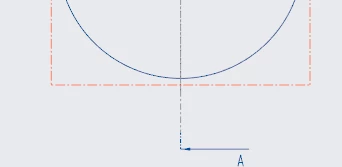
.dtl Setting for the Length of Section View Reference Lines
  • May 5, 2026
  • 3 replies
  • 38 views

I want the reference line for a section view to extend out of an orthogonal view less than it does here, by default. Is there a .dtl setting for that?

3 replies

Community Moderator
May 12, 2026

Hello EP_14482788,

Thank you for your question. 

Your post {.dtl Setting for the Length of Section View Reference Lines | Community} has not yet received any response. I am replying to raise awareness. Hopefully, another community member will be able to help.

Also, feel free to add any additional information you think might be relevant. It sometimes helps to have screenshots to better understand what you are trying to do.

Thanks,
Vivek N
Community Moderation Team


KenFarley
21-Topaz II
May 12, 2026

I don’t think there is a setting that specifically addresses your desires. I’ve just lived with this behavior for decades.

You could try scouring the drawing setup options. Here’s a good place to find them:

https://creosite.com/index.php/configuration/drawing-setup-option-search/complete-lists-of-drawing-setup-options/

I did a bit of a look, but didn’t see anything obvious. Look through them yourself for your particular version of Creo, maybe you’ll get lucky. It might be a case of some other setting affecting this one, too. Or, there might just not be a user-changeable setting. It wouldn’t be the first time.

16-Pearl
May 12, 2026

HI ​@EP_14482788 

There are a couple of knowledgebase articles that ask a similar question about the length of the section cutting line, distance between the view and arrow, and length of the arrows, both of which recommend to create a Product Idea to request the addition of such a feature.


CS247485 & CS76342