12-Amethyst
October 8, 2024
Solved

Set Standard Orientation

  • October 8, 2024
  • 2 replies
  • 2211 views

I want to change the standard orientation.
This was already discussed here: Standard Orientation view cannot be overwritten. - PTC Community

but the result isnt complete for me.


To Change the standard orientation, i have to change the x and y angle.

But i dont know how to change it. Can someone explaine it with a video if possible bcs i am using creo 10 in german language and it is not easy to follow the english instructions?

Best answer by GabrielZaha

Your approach seems to be the correct one: set the orientation to user-defined and then set the x_angle and y_angle to the desired values.

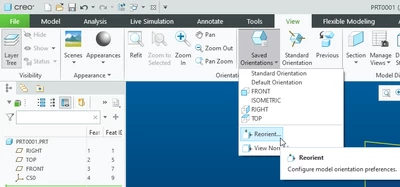
You can adjust the values for x_angle and y_angle directly in the model using the Reorient command. Go to View menu, expand the Saved Orientations button and select Reorient.
GabrielZaha_0-1728481459003.png

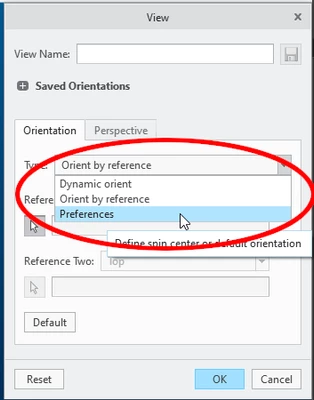
A dialog box called View will pop-up. Change the orientation type from "Orient by Reference" to "Preferences":
GabrielZaha_1-1728481604785.png

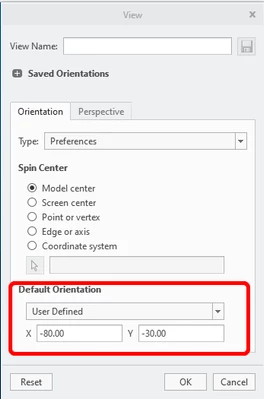
Make sure the default orientation is set to "User Defined". Type the values for X and Y angles and hit the Enter button. The model orientation should update.
GabrielZaha_2-1728482216742.png

When you are satisfied with the result write the two values somewhere and close the dialog box (OK or Cancel button)

Now you can go into configuration options and adjust the values for x_angle and y_angle options. The values for this two options are indeed, decimal degrees.


I'm not sure if you will be able to match the orientation from Direct Modeling, but, hopefully, you can get something close enough to be usable.

 

2 replies

24-Ruby III
October 8, 2024

Hi,

please describe using text & pictures:

1.] current standard orientation

2.] requested standard orientation

12-Amethyst
October 8, 2024

Current standard orientation:

current.png


requested standard orientation:

requested.png


by changing the setting to user_default, it becomes possible to change the axis:

OS_11014878_0-1728394548866.png


Changing the axis doesnt seem logical to me. Should that be in degree? 

OS_11014878_1-1728394625476.png

Is there a easier way to change the axis, maybe to visualize it, to see which axis it takes?


24-Ruby III
October 8, 2024

Hi,

I created new template. It is available in attachment. Does it behave as you want?

14-Alexandrite
October 9, 2024

Your approach seems to be the correct one: set the orientation to user-defined and then set the x_angle and y_angle to the desired values.

You can adjust the values for x_angle and y_angle directly in the model using the Reorient command. Go to View menu, expand the Saved Orientations button and select Reorient.

GabrielZaha_0-1728481459003.png

A dialog box called View will pop-up. Change the orientation type from "Orient by Reference" to "Preferences":

GabrielZaha_1-1728481604785.png

Make sure the default orientation is set to "User Defined". Type the values for X and Y angles and hit the Enter button. The model orientation should update.

GabrielZaha_2-1728482216742.png

When you are satisfied with the result write the two values somewhere and close the dialog box (OK or Cancel button)

Now you can go into configuration options and adjust the values for x_angle and y_angle options. The values for this two options are indeed, decimal degrees.


I'm not sure if you will be able to match the orientation from Direct Modeling, but, hopefully, you can get something close enough to be usable.