

13-Aquamarine
June 17, 2026
Solved

Modbus TCP/IP connection Circutor energy meter

  • June 17, 2026
  • 3 replies
  • 69 views

hi all,

I’m trying to setup a Modbus TCP/IP connection on a thingworx Kepware server 6.18, to an energy meter from Circutor (CVM-E3-MINI-ITF-WiEth, manual can be found here M170F01-03.pdf). I’ve setup connections to other energy meters before using Modbus TCP/IP without issues, but with this device I keep getting unrealistic values.

I’ve literally tried using all different combinations on Data access & encoding, but the output I’m seeing seems either extremely high or extremely low, sometimes more or less stable but often also varying a lot which can normal if the byte order was swapped.

The manual doesn’t really tell much on the Modbus-TCP setup, like what device-id I need to be using. So far I’ve tested mostly with device-ID 1 which seems most logical in that case, but I’ve used other device-id’s like 2 or 7.

I’m hoping anyone has some experience with these types of devices or recognizes this type of behaviour and has some ideas on how to solve it.
Many thanks in advance.

H.
Best answer by H0610

Hi all,
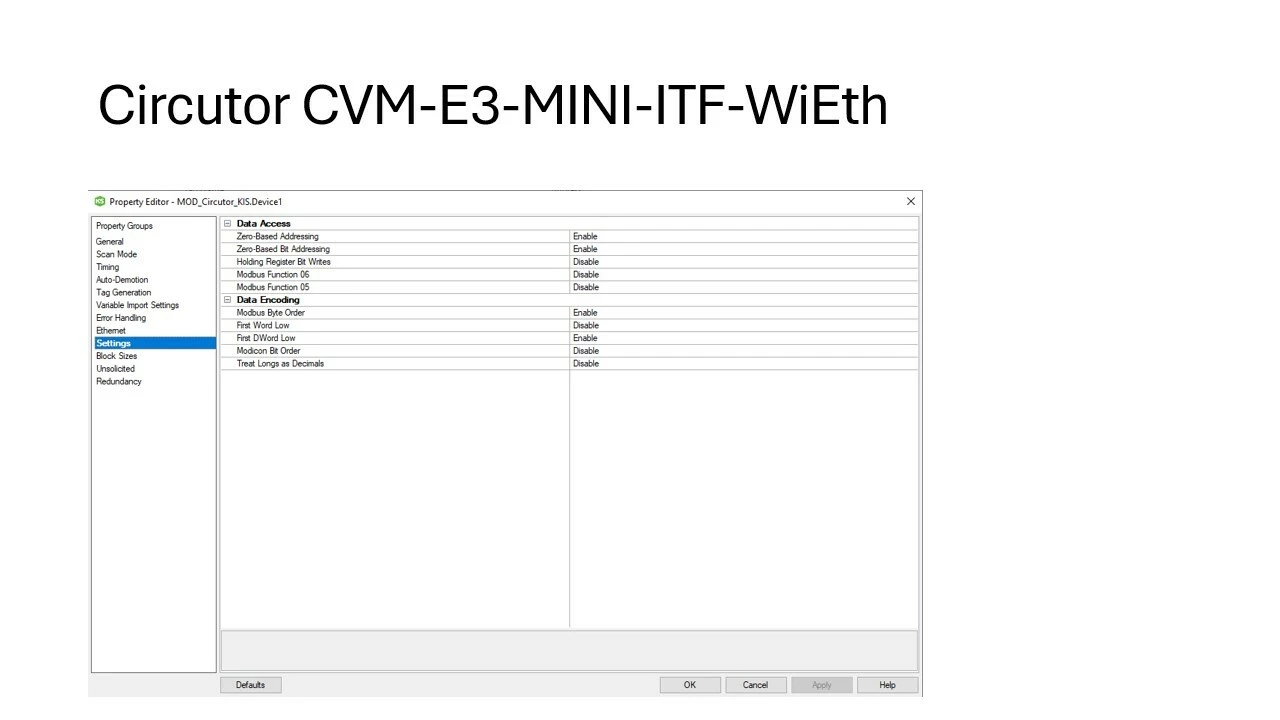
I found the issue was not with the device-id but the data encoding, here’s the correct setup for those that would need it (DWORD is not used hence it is still enabled here).
Device id was set to 1 since the modbus driver requires an input.


3 replies

Support
July 9, 2026

Hi ​@H0610,

I’m not very familar with Modbus TCP/IP or energy meter, but please review the articles below to see if they provide useful guidance. If you have questions regarding the device/slave ID or the correct Data Encoding configuration, I recommend reaching out to the equipment manufacturer, Circutor, for clarification.

https://www.ptc.com/en/support/article/CS299240

https://www.ptc.com/en/support/article/CS299224

Best,
Tony

Sankalp Yadav
5-Regular Member
July 10, 2026

I would recommend testing with modscan64 first. If you are able to read the values accurately then only Kepware can show the correct value.

Sankalp
H061013-AquamarineAuthorAnswer
13-Aquamarine
July 13, 2026

Hi all,
I found the issue was not with the device-id but the data encoding, here’s the correct setup for those that would need it (DWORD is not used hence it is still enabled here).
Device id was set to 1 since the modbus driver requires an input.