1-Visitor
December 11, 2015
Solved

3D file to blueprint for CNC

  • December 11, 2015
  • 1 reply
  • 4815 views

Hello,

I am a highschool robotics team captain, and my team is getting parts cnc'd that I designed in CREO Parametric 3.0. The milling company has requested to have the measurements 2d blueprint style, instead of the dxf, so that they can machine it differently. (less paths using their own generated file.) Is there any way to get a 2d picture of the 3d model with all the measurements, without going into every sketch and recording the measurements? Thanks for the help.

~Jacob


This thread is inactive and closed by the PTC Community Management Team. If you would like to provide a reply and re-open this thread, please notify the moderator and reference the thread. You may also use "Start a topic" button to ask a new question. Please be sure to include what version of the PTC product you are using so another community member knowledgeable about your version may be able to assist.

Best answer by StephenW

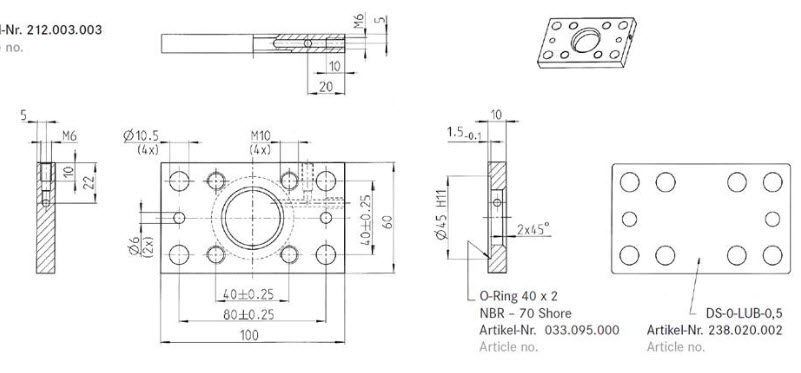
In industry, we typically make 2-D drawing for manufacturing. Is this what you are asking about? Similar to the image below.

The shop takes the drawing and makes their CNC program to the dimensions.

blueprint.jpg

1 reply

jseay1-VisitorAuthor
1-Visitor
December 11, 2015

Update: I and another member were able to figure out how to export as an .igs, and open as a sketch with dimension, however, CREO 3.0 will not open the file as a sketch, while 2.0 will. (the current files are 3.0). Does anyone know how to fix this, and how to get and .igs with more than just the front view? Thanks,

~Jacob

StephenW23-Emerald IIIAnswer
23-Emerald III
December 11, 2015

In industry, we typically make 2-D drawing for manufacturing. Is this what you are asking about? Similar to the image below.

The shop takes the drawing and makes their CNC program to the dimensions.

blueprint.jpg

jseay1-VisitorAuthor
1-Visitor
December 11, 2015

β€ŒYes, that looks right. Do I have  create a new sketch for each file then?