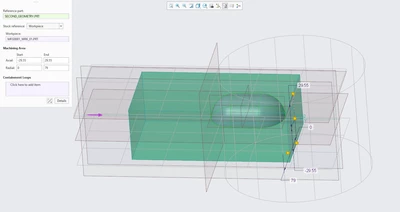
Question
4 axis HSM rotate machining area on a different axis
Hi everyone,
I just got access to Creo 11 and I'm struggling with one of the new features they added.
For this model I want to use 4 axis HSM, however even if I select the B axis as rotatory (which means it rotates around the Y axis) the machining area I can select is always a cylinder around the Z axis and I can't figure out how to change it. My work center settings also specify it revolves around the Y axis but it just doesn't allow me to change the axis of the machining area. Any idea on how to solve this?