

12-Amethyst
December 1, 2011
Question

Any one else seeing more toolpath errors?

  • December 1, 2011
  • 6 replies
  • 7452 views

I have been finding more and more gouges lately and i am wondering if any one else has been finding the same. MAINTAIN_CUT_TYPE will generate these strange circular gouges.
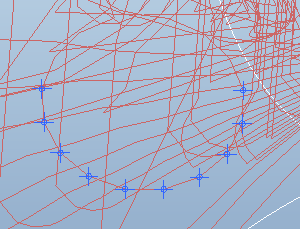
Capture1.PNG


This thread is inactive and closed by the PTC Community Management Team. If you would like to provide a reply and re-open this thread, please notify the moderator and reference the thread. You may also use "Start a topic" button to ask a new question. Please be sure to include what version of the PTC product you are using so another community member knowledgeable about your version may be able to assist.

6 replies

1-Visitor
December 2, 2011

Sorry to say this but I have never used Maintain_Cut_Type. What strategy is that in the picture?

12-Amethyst
December 5, 2011

The picture is from a roughing cycle

1-Visitor
December 5, 2011

What release are you using? I have seen similar output. We have also ran into an issue where the tool path will reverse the cut direction midway thru a cavity. Support says the issue has been resolved in Wildfire 5.0 M120 which is due out the end of December.

12-Amethyst
December 5, 2011

WF5 M100 but I have seen this circular error happen since wildfire 3 it just seems to be happening with much more frequency now. I'm to the point where I avoid using this cut type at the cost of cycle time.

1-Visitor
December 6, 2011

Wow... gouging with roughing is a serious problem. If you leave more stock will the gouges go away?

I don't use maintain cut type so I have never seen this. I try and use the constant load for roughing

12-Amethyst
December 6, 2011

Found another one today!

Capture2.PNG

1-Visitor
December 20, 2011

Here is a roughing error for you Nick!! Why do they always seem to be round. Software must be confused and running in circles!

gougecheck.JPG

12-Amethyst
December 20, 2011

yes I like that one! it is always circles have you noticed that adjusting the step over can effect these errors?

1-Visitor
December 21, 2011

Nick and Brian:

Just to make sure we're all in the same page: Was the problem formally reported to PTC? Did you get an SPR?

I'm assuming that the problem is not the same for both...

This seems critical and sometimes we think someone reported a problem but nobody did, so PTC don't fix it... I'm struggling with a problem when reversing cut direction and lead in / lead outs getting messed.. never reported because it as a very known flaw...I thought other people have done it... so, just in case...

1-Visitor
January 9, 2012

How about an error while profile milling while we are on toolpath errors!!

I do a lot of profile milling. Look at what I have been getting lately. I built a revolved mill surface for the profile cut then select that mill surface for the profile sequence. for some reason after making several correct passes it makes a pass outside the surface in another cut for no apparent reason!! WTF!! this stuff is really starting to bother me.Tired of trying to make good parts, But spending WAAAAY too much time trying to diagnose tool path errors on stuff in previous revs I could do without even thinking about.

revolved millsurface.JPG

8-Gravel
January 20, 2012

I have a question regarding profile milling. Thought i would ask because you said you do it alot. I want to sometimes do a profile around something and leave say .015" onthe the bottom of the part say so that the part won't break through the vacuum that is applied. I know if WF4 I could adjust a "Z offest) parameter which no longer exsists in WF5 NC. Do you or anyone have a way to do this in WF5 Pro\NC?

Jeff

12-Amethyst
January 20, 2012

AXIS_SHIFT

New Picture (5).bmp

1-Visitor
January 20, 2012

I’m having problems with “Customizing” some cuts like Engraving and Auxiliary sequences.

Windows says the Creo is not responding and need to close the program.

This may be simalar to Case 2107567

Creo 1.0 M020