16-Pearl
May 26, 2016
Solved

Layer state for part & drawing

  • May 26, 2016
  • 3 replies
  • 6434 views

Hello Community,


Is it possible to have different layer state for a part/assembly and its associated drawing.


For instance, I have a manufacturing file with many milling windows. I have created a layer driven by a rule to isolate these. I would like to hide milling windows in my manufacturing document for the workshop, and keep these milling windows displayed in the manufacturing assembly.


This thread is inactive and closed by the PTC Community Management Team. If you would like to provide a reply and re-open this thread, please notify the moderator and reference the thread. You may also use "Start a topic" button to ask a new question. Please be sure to include what version of the PTC product you are using so another community member knowledgeable about your version may be able to assist.

Best answer by StephenW

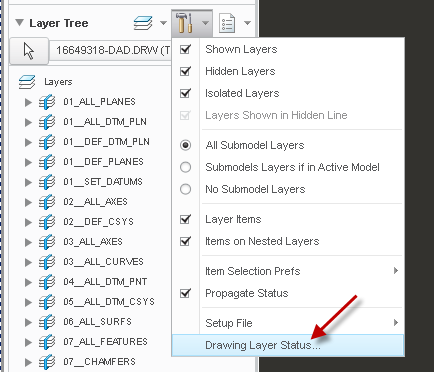
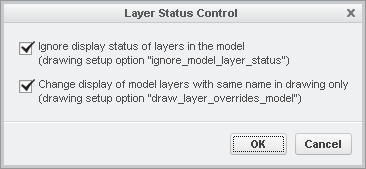
Yes, in the drawing, there are 2 options under the drawing layer status:

3 replies

StephenW23-Emerald IIIAnswer
23-Emerald III
May 26, 2016

Yes, in the drawing, there are 2 options under the drawing layer status:

RaphMORIN16-PearlAuthor
16-Pearl
May 27, 2016

In fact, I'm still having a problem.

In my model I made a layer with a rule to select all milling windows

In the drawing I configured as Stephen shown. In the drawing I hide the layer then save the layer status. I go back to the manufacturing file, the windows are still shown, that's cool. But if I go back to the drawing the milling windows are shown again even if the icon in the layer status shows it's hidden !! (Milling windows are shown in purple on the drawing). What am I doing wrong ?

23-Emerald III
May 27, 2016

I can only think of one reason, you have that view controlled independently from the drawing layers.

You can see this if you select the arrow icon in the layer tree. Notice on the image below, all the view boundaries are shown in blue (this may be a different color on your setup, I have custom colors assigned). If any of your view are green (or different colors) you have independently controlled the layers for this view.

If you don't want the view to be controlled by the overall drawing layers (recommended), select that view boundary. Then in the layer menu, select DRAWING DEPENDENT.

18-Opal
May 26, 2016

Hi Raphael,

Did Stephen's response help answer your question.  If so, please mark it as the Correct Answer, so other users with the same question can find the solution quickly.

Thanks,

Amit

RaphMORIN16-PearlAuthor
16-Pearl
May 27, 2016

Thanks Stephen, this is what I was looking for.

18-Opal
May 27, 2016

Thanks Raphael.