1-Visitor
May 22, 2013
Solved

Roughing - Reroughing

  • May 22, 2013
  • 5 replies
  • 4647 views

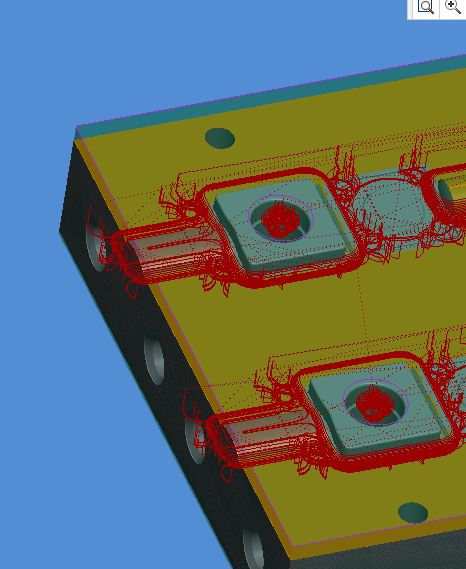
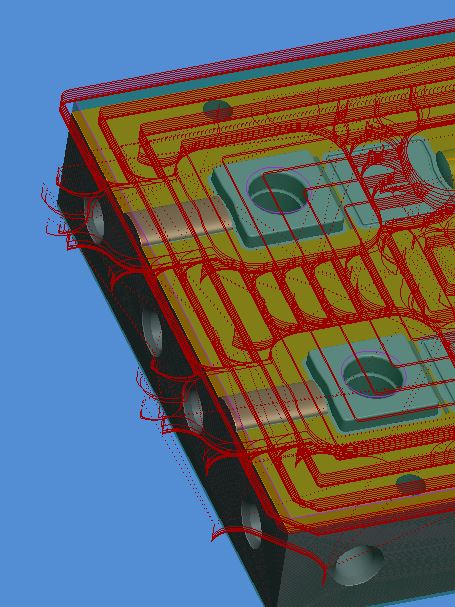
I have a roughing sequence with a sketched window.750 diameter high feed mill pictured below.It works great. I then do a rerough to tighten up the corners with a solid carbide .375 high feed end mill and it drops into the core holes. I don't want it to drop into the core holes but I don't see a way to exclude surfaces in the re - rough routine. with regular volume roughing with a mill window. you can exclude surfaces? am I missing an exclude command somewhere or did that get left out of the rerough.

anyone have any ideas?
roughing.JPG

rerough.JPG


This thread is inactive and closed by the PTC Community Management Team. If you would like to provide a reply and re-open this thread, please notify the moderator and reference the thread. You may also use "Start a topic" button to ask a new question. Please be sure to include what version of the PTC product you are using so another community member knowledgeable about your version may be able to assist.
Best answer by NickMihelich

Yes you can define new widows for re-roughing sequences I do it all the time. I did think of another trick that might work for ya. just create some solid extrude cylinders and assemble them into the holes.

5 replies

12-Amethyst
May 22, 2013

Try this define a new sketched window for your re-roughing with the core hole edges refrenced.

1-Visitor
May 22, 2013

Hi Nick,

It is a sketched window with the core holes refrenced. if you look at the the second picture close you can see a purple line around the core holes. that is what has me baffled. I kind of anticipated that happening so I made the sketch for roughing with the holes. but even so it still cuts inside. Also can you reference a roughing routine with the rerough and then create a new sketch for the rerough? Not sure it will recalculate what has already been cut ?

I guess I am back to using volume rough. and making a couple different sketches to rough and rerough or the old nasty mill volume that no one likes anymore except me I think.

How come in all the demos of this stuff they can just make 1 mill window and rough rerough and finish the whole mold with 3 tools? isn't that how it's supposed to work in the real world. just like the demos!! LOL

Steve

12-Amethyst
May 22, 2013

Yes you can define new widows for re-roughing sequences I do it all the time. I did think of another trick that might work for ya. just create some solid extrude cylinders and assemble them into the holes.

1-Visitor
May 23, 2013

Steve,

I totally agree with you on this, I run into the same problems with others working on the same model. That is typicaly why i use volume mill and create my volumes so i dont modify the original model.

1-Visitor
May 23, 2013

Brian,

Not The dreaded volume mill !!! Don't you know that is not the way PTC wants us to work any more. Mill windows is the future!!

Sorry for my sarcasim. A little P.Off right now.

Steve

1-Visitor
May 29, 2013

you could try the "loops to close" option to get the cutter to avoid your holes.loops+to+close.bmp

12-Amethyst
May 29, 2013

I dont believe that option is available for re-roughing

1-Visitor
May 29, 2013

Nick is right Paul you loose the close loops when you rerough.

I have this in as a product sugestion. if you could go and vote for it to be implementedthat would be great. the more interest there is the more chance it has of happening. I think the product sugestion is on the creo front page on the right. Took me a while to find it to get the sugestion in.

Dale_Rosema
23-Emerald III
23-Emerald III
May 29, 2013

Can you paste a link?

1-Visitor
May 29, 2013

here is a link. I did a search for mill window if it doesn't work. Dale you already voted for it!

http://communities.ptc.com/ideas/2718