
15-Moonstone
April 20, 2017
Question

Roughing sequence and plunge feed

  • April 20, 2017
  • 1 reply
  • 4684 views

Dear all,

When using the roughing sequence to rough a pocket I see there is no option to enter a plunge feed.

When using an end mill this is essential in order not to damage the flutes.

I've tried entering a ramp speed and specify explicitly a ramp angle of 90° (which is the default setting).

This has no effect on the resulting toolpath. The only feed applied is the default cut_feed.
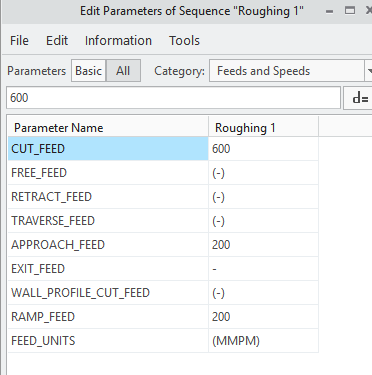
2017-04-20_11-02-40.png

The volume rough sequence does have this option but I can't use that sequence for this particular toolpath.
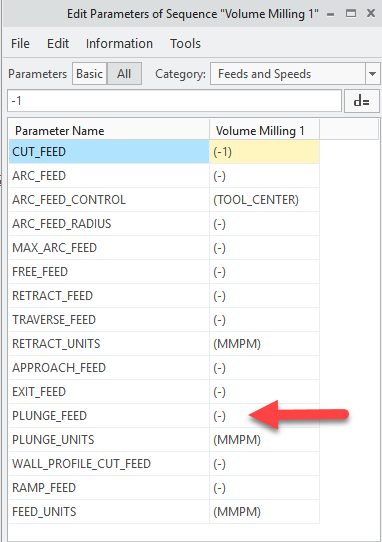
2017-04-20_11-04-06.png

Is it possible to specify a plunge feed with the roughing sequence ?

   John
   KU Leuven - Technology campus Diepenbeek

1 reply

16-Pearl
April 20, 2017

Hi John,

If you are using the new volume milling sequence you must then specify the entry type defined to ramp as image below. With the old volume milling you just have to specify the ramp angle and speed and Creo understands you want a ramp entry ! By the way I'm still not using the new volume milling sequence as I don't find it very "logical" !

JB_8704915-MoonstoneAuthor
15-Moonstone
April 20, 2017

Merci beaucoup pour votre response.

I've now found that the new "roughing"-nc sequence, the one that uses a faceted model internally and which is the one I'm referring to, has a slightly different option set (in Creo 4 M010) as can be seen in the following screenshot.

2017-04-20_15-24-53.png

Although I have now specified RAMP explicitly and specified a RAMP FEED (see the following picture)

I still no see a different feed in the cutter location file with respect to the first entry

   John

   KU Leuven - Technology campus Diepenbeek - CAD2CAM  

1-Visitor
April 20, 2017

It works on my System with Creo4.0 M10

in roughing If I specify a ramp feed different from the cut feed it shows as different. But it is not a straight plunge it is a helical cut into the part.

rough_ramp.jpg

Here is the code output with the feed at 50 as specified in the ramp_feed  parameter.

roughing tool path code.jpg

Here is what it looks like again it is not a ramp as you would think. it's an odd helix even though I have it set to ramp.

rough_toolpath.jpg

roughtoolpath2.png