

1-Visitor
August 4, 2015
Solved

Slot along a path

  • August 4, 2015
  • 2 replies
  • 3157 views

Hi,


I would like to create a slot along a path to create the same results and in the picture below.
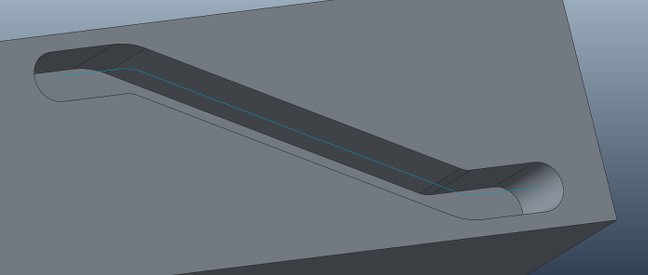
slot.png

However I would like to do it slightly differently by sketching a circle on the origin and have that circle follow the path to create a slot just like a mill would do by plunging the cutter into the workpiece. I am at a loss on how to do this or if it is even possible in Creo 3.0.

I can get close but any options would require a plunge depth that I do not think exists


I hope I am making sense.


Thank you for any help offered.


Miles.


This thread is inactive and closed by the PTC Community Management Team. If you would like to provide a reply and re-open this thread, please notify the moderator and reference the thread. You may also use "Start a topic" button to ask a new question. Please be sure to include what version of the PTC product you are using so another community member knowledgeable about your version may be able to assist.
Best answer by TomU

The sweeps in Creo are planar sections and do not accurately represent what a circular cutting tool does as it moves along a path.  Take a look as these two discussion for more info:

Barrel Cam Modeling

2 replies

TomU23-Emerald IVAnswer
23-Emerald IV
August 4, 2015

The sweeps in Creo are planar sections and do not accurately represent what a circular cutting tool does as it moves along a path.  Take a look as these two discussion for more info:

Barrel Cam Modeling

1-Visitor
August 4, 2015

Thank you Tom.

It is as I thought then. I can get on with the rest of my life now. 😉

1-Visitor
August 4, 2015

For 2d type of milling that your image suggests, using a sweep feature which cross-section is normal to trajectory will accurately represent a rotating cutter removing material:

SWEEP_TEST.png

So you can create the entire slot with a group of 3 features: the circular extrusions at the beginning and end of the "toolpath", and the sweep in-between.

attached is creo 2.0 example.

1-Visitor
August 4, 2015

Thank you Paul,

That is close to how I currently do it. I just wondered if it could be created with a single feature.

I like the way you have verified it though. I will be using that method to double check some of my more complex designs.