
12-Amethyst
October 13, 2016
Question

Trajectory Milling

  • October 13, 2016
  • 4 replies
  • 8623 views

Had some free time to work on this today.  Source link

I created a curve by equation and used that to drive a trajectory milling sequence for some long slots I needed to mill.
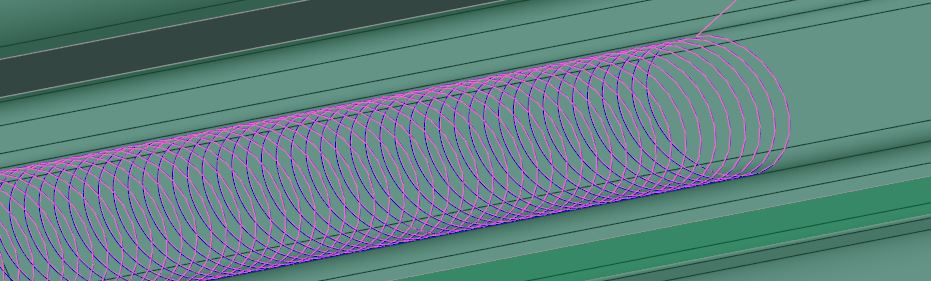
Capture.JPG

here is the equation I used to create this curve.

/* ENTER TOOL STEP OVER

SO = 0.05

/* EMPIRICAL VALUE TO CORRECT SHAPE ERROR

SF = 0.0175

/* ENTER PROFILE ALLOWANCE (STOCK)

PA = 0.005

/* ENTER TOOL CUTTER DIAMETER

CD = .3937

/* ENTER SLOT WIDTH

SW = 0.811977

/* ENTER NUMBER OF REVOLUTIONS

N = 100

A = ( ( SO * SF ) / 3.141592654 ) / 2

B = ( ( SW - ( 2 * PA ) ) - CD ) / 2

x = ( A * ( t * N * 360 )) - ( B * sin ( t * N * 360 ) )

y = ( B * cos ( t * N * 360 ))

z = 0

I don't understand what the shape error value is about but it seems to work for this application.  Just thought i should share this with everyone in case they wanted to use it or improve it


This thread is inactive and closed by the PTC Community Management Team. If you would like to provide a reply and re-open this thread, please notify the moderator and reference the thread. You may also use "Start a topic" button to ask a new question. Please be sure to include what version of the PTC product you are using so another community member knowledgeable about your version may be able to assist.

4 replies

1-Visitor
October 13, 2016

Nick,

Nice looking tool path !

12-Amethyst
October 13, 2016

Thank you

I'm finding that the cl data and g-code is all points so now am looking into arc fitting but not sure if this is a wise move.

1-Visitor
October 13, 2016

Interesting application.

If you are using creo3you can do something similar using volume-mill and the cl data isn't all pts. This would allow you to control tool selection and parameter adjustment normally. You can also do slots that aren't straight.

Josh

12-Amethyst
October 13, 2016

oooh i like the look of that cl data but volumill is extra $ correct?

1-Visitor
October 13, 2016

Don't know, sorry.

Josh

1-Visitor
October 14, 2016

I haven't been doing any programming for a couple years now, but was reading through the forum to see what's new.  I used a similar technique as Nick and also didn't have an accurate solution to the step-over value - I just tweaked the STEP value to get what I needed.  I didn't use it frequently enough to invest time resolving the step over issue.

Throchoidal milling curve:  I used a CSYS to anchor the start of the curve orientation of the path - the default vector for the path is Y+.   I could also juggle the X/Y calculations to control the vector and climb/conventional cutting condition as shown in the example.

/*-------------------------------------------------------------------
/*
/* RAD  = radius of path (slot_radius - cutter_radius)
/* STEP = determines "step-over", **STILL GUESSING ON VALUE**
/* DIST = total travel distance
/* DEGS = CALCULATED, DEGREES: distance_required/step*2*360
/*   -------  FORMAT -------
/* x = (STEP-RAD*cos(t*DEGS))-STEP
/* y = STEP*((t*DEGS*STEP*3.14159)/360) - RAD*sin(t*DEGS)
/* z = 0.
/*
/* -- OPTIONAL -- ADD THE FOLLOWING PARAMETERS TO THE ASSEMBLY --
/* NR: RAD  (REAL NUMBER, 0.0)
/* NR: STEP (REAL NUMBER, 0.0)
/* NR: DIST (REAL NUMBER, 0.0)
/* NR: DEGS (REAL NUMBER, 0.0)
/*
/*
/*------------------------------------------------------------------
/* -- IN SAMPLE BELOW X/Y REVERSED FOR X+ ADVANCING CUTS
/* -- IN SAMPLE BELOW Y IS REVERSED FOR CLIMB:  "-(STEP" & "+STEP"

RAD=.03
STEP=.095
DIST=2.
DEGS=(DIST/STEP)*720

Y = -(STEP-RAD*COS(t*DEGS))+STEP
X = STEP*((t*DEGS*STEP*3.14159)/360) - RAD*sin(t*DEGS)
z = 0.


14-Alexandrite
October 21, 2016

Set hidden option in your config.pro

trochoid_milling yes

Then in your parameters of 3 axisTrajectory miling appears 2 additional parameters:

TROCHOID_WIDTH and TROCHOID_STEP

trochoid.jpg

and then you can use it.

1-Visitor
October 22, 2016

QQ截图20161022211902.jpgQQ截图20161022100823.jpg